Can You Use Cricut For Sewing Patterns And Even More
Yes, you can use a Cricut machine for sewing patterns, and it opens up exciting new possibilities for crafters and sewists alike. The Cricut cutting machine helps you create precise fabric templates, iron-on designs, and custom sewing accessories with ease. Whether you are a beginner or a seasoned sewist, this versatile tool can elevate your projects and save you time. Let us explore how Cricut for sewing patterns works and what you can create.
Key Takeaways
- Cricut machines can cut fabric and create sewing patterns with precision and ease.
- Design Space software lets you customize templates and export them for sewing projects.
- Iron-on vinyl and heat transfer materials work great for embellishing sewn items.
- Fabric cutting mats and proper blades are essential for clean, accurate cuts.
- Common mistakes include using the wrong blade or skipping material settings.
- Creative possibilities include custom patches, fabric stencils, and personalized sewing accessories.
📑 Table of Contents
- Can You Use Cricut For Sewing Patterns And Beyond?
- Understanding How Cricut Machines Work for Fabric Projects
- Using Cricut for Sewing Patterns: Step by Step
- Creative Projects You Can Make with Cricut and Sewing
- Advantages of Using Cricut for Sewing Pattern Work
- Limitations and Challenges to Keep in Mind
- Expert Tips for Getting the Best Results
- Final Thoughts on Using Cricut for Sewing Patterns
Can You Use Cricut For Sewing Patterns And Beyond?
If you love crafting and sewing, you have probably wondered whether a Cricut machine can help with your sewing patterns. The short answer is yes! A Cricut cutting machine is not just for paper crafts and vinyl decals anymore. Crafters around the world are using these electronic cutting machines to create fabric templates, custom patterns, and unique sewing accessories.
Using a Cricut for sewing patterns can save you hours of hand-cutting and tracing. The precision of the blade means your templates come out clean and accurate every time. In this article, we will walk you through everything you need to know. From setting up your machine to exploring creative projects, we have you covered.
Many people think of Cricut machines as simple paper cutters. But these devices are so much more. They can handle fabric, vinyl, leather, and many other materials. If you are a DIY sewing enthusiast, learning how to use your Cricut for pattern making can truly change your crafting game.
Understanding How Cricut Machines Work for Fabric Projects
What Is a Cricut Machine?
A Cricut machine is an electronic cutting machine that uses a small blade to cut designs into various materials. You load a material onto a cutting mat, send a design from your computer or phone, and the machine does the rest. The process is simple, fast, and incredibly precise.
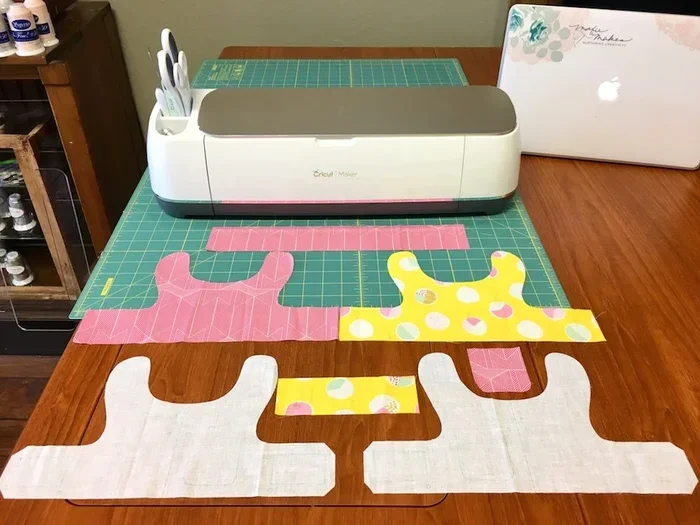
The most popular models include the Cricut Explore series and the Cricut Maker. The Maker is especially powerful because it can cut through thicker materials like leather and multiple layers of fabric. Both machines connect to a computer or mobile device through Bluetooth or USB.
The software that drives these machines is called Cricut Design Space. This is where you create, edit, and send your designs to the cutting machine. Design Space has a huge library of pre-made images and fonts, and you can also upload your own custom designs.
How Does Fabric Cutting Work?
Cutting fabric with a Cricut requires a few specific tools. You need a fabric cutting mat, which has a sticky surface that holds the fabric in place during cutting. Standard Cricut mats work well for lightweight fabrics like cotton and quilting cotton.
For heavier fabrics like denim or canvas, you may need to use a stronger grip mat or even a blade adapter. The Fine Point Blade is the standard blade that comes with most Cricut machines. It works great for lightweight to medium-weight fabrics.
Before you cut, always make sure to test your settings on a scrap piece of fabric. This helps you avoid wasted material and ensures clean cuts. Adjust the pressure and blade depth based on the fabric type you are using.
Using Cricut for Sewing Patterns: Step by Step
Step 1: Design or Upload Your Pattern
The first step in creating sewing patterns with a Cricut is designing your template. You can use Cricut Design Space to draw custom shapes or upload SVG files of existing patterns. Many crafters share free sewing pattern templates online that you can download and use directly.
If you prefer to draw your own patterns, Design Space has basic shape tools that let you create rectangles, circles, and custom curves. For more complex patterns, you might want to design them in a separate program and then upload the file as an SVG.
Here are some popular pattern types you can create:
- Fabric squares and rectangles for patchwork
- Curved template shapes for garment sewing
- Custom pockets and collar shapes
- Quilting block templates
- Fabric stencils for decorative projects
Step 2: Prepare Your Fabric
Proper fabric preparation is key to getting great results. Start by ironing your fabric to remove any wrinkles. Wrinkles cause the fabric to lift unevenly, which leads to inaccurate cuts.
Next, place your fabric onto the cutting mat. Smooth it down firmly so there are no bubbles or folds. For very lightweight fabrics, you can use a light grip mat. For heavier fabrics, use the standard or strong grip mat.
Some crafters also use woven fusible interfacing on the back of delicate fabrics. This adds stability and prevents the fabric from stretching or shifting during cutting.
Step 3: Set Up Your Cutting Parameters
In Design Space, select the material type that matches your fabric. Cricut has a built-in material list that includes cotton, polyester, linen, and more. Choosing the right material setting ensures the blade applies the correct amount of pressure.
Always start with a test cut on a small piece of fabric. Check the cut quality and adjust the pressure if needed. You want the blade to cut all the way through without damaging the cutting mat underneath.
Here are some quick tips for setting up your cuts:
- Use the Weedng Tool to carefully remove excess fabric after cutting
- Cut one layer at a time for the best accuracy
- Replace your blade regularly for clean cuts
- Clean your cutting mat with a lint roller to maintain stickiness
Step 4: Use Your Templates for Sewing
Once your fabric pieces are cut, you can use them just like any traditional sewing pattern template. Place them on your fabric, trace around them with fabric chalk or a washable marker, and cut with scissors or a rotary cutter.
Alternatively, you can cut directly through the fabric with the Cricut and use the pieces right away. This works best for projects where precision matters, like quilt blocks or fitted garment pieces.
The beauty of using a Cricut for sewing patterns is the repeatability. Once you have a design saved, you can cut the same template over and over again. This is perfect for batch projects or when you need multiple copies of the same piece.
Creative Projects You Can Make with Cricut and Sewing
Custom Iron-On Patches
One of the most popular projects is creating custom iron-on patches. You design your patch in Design Space, cut it from iron-on vinyl, and then use a heat press or iron to apply it to your sewn items. This works great for labeling handmade clothes, decorating tote bags, or personalizing gifts.
You can also layer multiple vinyl colors to create multi-colored patches. Just cut each color separately and weed the excess before applying them to your fabric. The result looks professional and lasts through many washes.
Fabric Stencils and Decorated Clothing
Cricut machines can cut fabric stencils from heat transfer material or adhesive vinyl. You place the stencil on your fabric, apply paint or fabric marker, and remove the stencil to reveal a crisp design. This technique works beautifully for t-shirts, tote bags, and pillowcases.
For a more permanent design, try using infusible ink transfers. These special sheets allow you to transfer designs directly into the fabric using heat. The result is vibrant, washable, and feels like part of the fabric rather than sitting on top of it.
Sewing Accessories and Organizers
Use your Cricut to create custom sewing accessories like fabric organizers, pin cushions, and thread spool holders. You can cut precise shapes from fabric and assemble them into functional items for your sewing workspace.
Another fun idea is creating custom fabric labels for your handmade items. Cut a label shape from woven label material, add your text in Design Space, and iron it onto your finished projects. This gives your work a polished, professional look.
Advantages of Using Cricut for Sewing Pattern Work
There are many reasons why crafters love using a Cricut machine for sewing-related projects. Here are some of the top advantages:
- Precision: The cutting blade is incredibly accurate, giving you clean edges and exact measurements every time.
- Speed: What might take you 30 minutes to cut by hand takes just minutes with a Cricut.
- Repeatability: Save your designs and cut the same pattern pieces again and again without any loss of accuracy.
- Versatility: A Cricut can cut fabric, vinyl, leather, and many other materials, making it useful for many different project types.
- Ease of Use: The Design Space software is beginner-friendly, and Cricut offers plenty of tutorials and guides to help you get started.
- Cost Savings: Instead of buying expensive pre-made patterns, you can create your own templates for free or very little cost.
Many crafters also appreciate how the Cricut connects to online design communities. You can download thousands of free and paid designs from the Cricut Access subscription library. This gives you access to a massive library of sewing templates, fabric designs, and craft files without ever leaving Design Space.
When comparing the Cricut to traditional methods, the advantages become even clearer. Instead of tracing patterns onto paper and then transferring them to fabric, you can cut directly from your digital design. This reduces errors and saves valuable time in your crafting workflow.
Limitations and Challenges to Keep in Mind
Material Limitations
While Cricut machines are versatile, they do have some limitations. Very thick or layered fabrics can be difficult to cut cleanly. The machine works best with single layers of lightweight to medium-weight materials.
Stretchy fabrics like jersey and knits can also be tricky. The fabric may shift during cutting, leading to inaccurate shapes. Using a stabilizer or interfacing can help, but it adds an extra step to your workflow.
Learning Curve
If you are new to Cricut machines, there is a learning curve involved. Understanding how to set up materials, adjust blade pressure, and troubleshoot cutting issues takes time and practice. Do not get discouraged if your first few cuts are not perfect.
Many crafters find that watching tutorial videos and joining online Cricut communities helps them learn faster. The Cricut community is very active and full of helpful tips for beginners and advanced users alike.
Machine Maintenance
Like any tool, your Cricut machine needs regular maintenance to perform at its best. Keep the blade clean, replace it when it becomes dull, and store the machine in a dust-free environment. Proper care extends the life of your machine and ensures consistent cutting quality.
Expert Tips for Getting the Best Results
Here are some expert tips to help you get the most out of your Cricut machine for sewing projects:
- Always use a fresh blade for fabric cutting. Dull blades cause fraying and uneven edges.
- Use painter’s tape to secure fabric edges that might shift during cutting.
- Save your designs in Design Space so you can reuse them for future projects.
- Join online Cricut groups to learn new techniques and get inspiration from other crafters.
- Invest in a good iron press for applying iron-on designs to your sewn items.
- Experiment with different fabrics to learn how each one behaves during cutting.
One important thing to remember is that the Cricut machine is a tool, not a replacement for your sewing skills. It handles the cutting and pattern-making steps beautifully, but you still need your sewing machine and hands-on crafting knowledge to bring projects to life. Think of the Cricut as a powerful assistant that handles the detailed cutting work while you focus on the creative assembly.
Many experienced sewists also recommend exploring how digital design tools connect with crafting workflows. Understanding the broader ecosystem of digital crafting communication can help you get more out of your machine and the software that drives it. This knowledge helps you make better design choices and troubleshoot issues more effectively.
As you grow more comfortable with your Cricut, you will find new and exciting ways to incorporate it into your sewing routine. From simple fabric templates to complex multi-material projects, the possibilities are truly endless. The key is to start small, practice regularly, and have fun with the process.
Final Thoughts on Using Cricut for Sewing Patterns
Using a Cricut machine for sewing patterns is a fantastic way to bring precision, speed, and creativity into your crafting projects. Whether you are making simple fabric templates or elaborate iron-on designs, the Cricut gives you the tools to bring your vision to life.
The process is easier than most people think. With a little practice, you will be creating custom sewing patterns, decorated clothing, and unique fabric accessories in no time. The investment in a Cricut machine pays off quickly when you see how much time and effort it saves you.
Remember that every expert started as a beginner. Do not be afraid to experiment, make mistakes, and learn along the way. The crafting community is supportive and full of resources to help you succeed. So grab your Cricut, pick a project, and start creating something amazing today!
Frequently Asked Questions
Can a Cricut machine cut fabric directly?
Yes, a Cricut machine can cut fabric directly when you use the right cutting mat and blade settings. Lightweight fabrics like cotton and quilting cotton work best. Always do a test cut first to make sure your settings are correct.
Do I need special software to create sewing patterns with Cricut?
You need Cricut Design Space, which comes free with your Cricut machine. Design Space lets you create custom designs, upload SVG files, and send patterns to your cutting machine. It is beginner-friendly and includes many helpful tutorials.
What type of blade is best for cutting fabric?
The Fine Point Blade that comes standard with most Cricut machines works well for lightweight to medium-weight fabrics. For heavier fabrics, you may need to adjust the pressure settings or use a deeper cut blade.
Can I use Cricut-made templates with my sewing machine?
Absolutely! Once you cut your fabric templates with the Cricut, you can use them just like any traditional sewing pattern. Place them on your fabric, trace the outline, and sew your pieces together with your sewing machine.
Is Cricut Design Space free to use?
Cricut Design Space is free to download and use. However, a Cricut Access subscription gives you access to thousands of pre-made designs, images, and fonts. You can still create and upload your own designs for free without a subscription.
What materials besides fabric can I cut with my Cricut for sewing projects?
Beyond fabric, you can cut iron-on vinyl, heat transfer materials, adhesive vinyl, and paper templates. These materials let you add decorative elements, labels, and embellishments to your sewn creations.
=== CONCLUSION ===
Using a Cricut machine for sewing patterns is one of the most rewarding upgrades a crafter can make. It brings precision, speed, and endless creative possibilities to your sewing projects. From cutting fabric templates to designing custom iron-on decorations, the Cricut proves itself as a versatile and valuable tool in any sewing enthusiast’s workshop.
Start with simple projects, practice your technique, and gradually take on more complex designs. The more you use your Cricut for sewing, the more confident and creative you will become. Happy crafting!