Do Projectors Connect To Bluetooth Speakers Wirelessly
Yes, most modern projectors can connect to Bluetooth speakers wirelessly. You can pair your projector with portable Bluetooth speakers, soundbars, or even your home theater system for better sound. This guide covers Bluetooth projector pairing, troubleshooting tips, and the best wireless audio setups for any room.
This is a comprehensive guide about Do Projectors Connect To Bluetooth Speakers.
Key Takeaways
- Bluetooth connectivity is standard on most new projectors: Check your model before buying extra equipment.
- You can connect Bluetooth speakers, soundbars, and headphones: The process is simple and works across brands.
- Older projectors may need a Bluetooth transmitter: A cheap dongle adds wireless audio to any projector with an audio out port.
- Audio lag can be an issue: Use Bluetooth 5.0 or lower-latency codecs for synced sound.
- Wired connections still work best for gaming: HDMI ARC or a 3.5mm cable eliminates delay.
- Range matters: Keep your speaker within 30 feet of the projector for a stable connection.
[FEATURED_IMAGE_PLACEHOLDER]
Do projectors connect to Bluetooth speakers? The short answer is yes. If you have been stuck watching movies on your projector with tinny built-in sound, you are not alone. Many people want to know whether they can ditch the cables and go wireless with their audio setup.
The good news is that Bluetooth projector connectivity has come a long way. Most projectors made in the last few years support Bluetooth right out of the box. You can pair them with portable Bluetooth speakers, soundbars, or even your home theater receiver. The process is usually quick and painless.
But not all projectors are the same. Some older models do not have built-in Bluetooth. And even newer ones sometimes have quirks that make pairing tricky. In this guide, we will walk you through everything you need to know. From pairing steps to troubleshooting audio lag, we have you covered.
Whether you are setting up a home theater, giving a presentation, or just want better sound for movie night, this article will help you get your projector and Bluetooth speaker working together. Let us dive in.
Do Projectors Have Bluetooth Built In?
The answer depends on your projector model. Newer projectors almost always include Bluetooth support. Budget models and older units may not. Here is how to tell what you have.
Check Your Projector Settings
Open your projector menu and look for a Bluetooth or Wireless section. If you see it, you are good to go. Most brands like Epson, BenQ, and Anker include this feature in their mid-range and premium models.
Look at the Specs Online
Check the product page or user manual. Look for terms like “Bluetooth 5.0” or “Wireless Audio.” If the spec sheet mentions Bluetooth, your projector can connect to wireless speakers.
What If Your Projector Does Not Have Bluetooth?
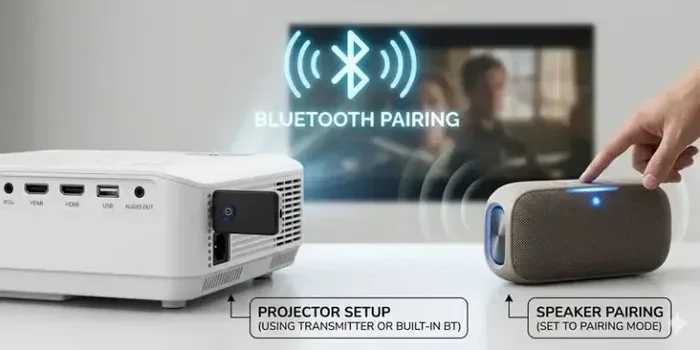
No worries. You can still add wireless audio. A Bluetooth transmitter plugs into your projector’s audio out port and sends sound to any Bluetooth speaker. These transmitters cost under $20 and work great. You can also check if your setup is similar to how you can use a USB Bluetooth dongle on your TV to add wireless capability.
How to Connect a Bluetooth Speaker to a Projector
Pairing your projector with a wireless speaker is straightforward. Follow these steps and you will be listening to great sound in minutes.
Step 1: Turn on Bluetooth on Your Projector
Go to your projector settings. Find the Bluetooth option and turn it on. Some projectors enter pairing mode automatically. Others require you to select “Pair New Device.”
Step 2: Put Your Speaker in Pairing Mode
Press and hold the Bluetooth button on your speaker. Wait for the LED light to flash. This means it is ready to connect.
Step 3: Select Your Speaker from the Projector
On your projector screen, look for your speaker name in the list of available devices. Tap or select it. Wait for the connection to complete.
Step 4: Test the Audio
Play a video or audio clip. If you hear sound through your speaker, you are all set. If not, move to the troubleshooting section below.
Quick Tips for a Smooth Connection
- Keep your speaker close to the projector during pairing.
- Make sure no other devices are interfering with the connection.
- Restart both devices if the pairing fails the first time.
- Update your projector firmware if available.
The process is very similar to how you would connect your laptop to a TV wirelessly. The same Bluetooth principles apply across devices.
Best Bluetooth Speakers for Projectors
Not all Bluetooth speakers are the same. Some work better with projectors than others. Here are the types to consider.
Portable Bluetooth Speakers
These are small, battery-powered, and easy to move around. Brands like JBL, Anker, and UE make great options. They are perfect for outdoor movie nights or casual viewing.
Soundbars
A soundbar gives you richer, fuller sound than a portable speaker. Many soundbars support Bluetooth and can connect to a projector easily. They are a great upgrade for a home theater setup.
Home Theater Receivers with Bluetooth
If you want the best sound possible, use a receiver. It connects to your projector via HDMI and accepts Bluetooth input from your phone or tablet. This setup gives you surround sound and volume control.
Comparison Table: Speaker Types for Projectors
| Speaker Type | Portability | Sound Quality | Price Range | Best For |
|---|---|---|---|---|
| Portable Bluetooth Speaker | High | Good | $30-$150 | Outdoor movies, casual use |
| Soundbar | Medium | Very Good | $100-$500 | Home theater setup |
| Home Theater Receiver | Low | Excellent | $200-$1000+ | Dedicated viewing room |
| Bluetooth Transmitter (add-on) | High | Depends on speaker | $15-$40 | Older projectors without Bluetooth |
You might also be interested in how Bluetooth works with other devices. For example, you can use any Bluetooth headphones with your TV in a similar way you connect them to a projector.
Common Problems and How to Fix Them
Even when everything works, you might run into issues. Here are the most common ones and how to solve them.
Audio Lag or Delay
This is the number one complaint with Bluetooth audio on projectors. You see the lips move, but the sound comes a second late. It is annoying but fixable.
- Use Bluetooth 5.0 or newer for lower latency.
- Switch to aptX or aptX Low Latency codecs if your devices support them.
- For gaming or fast action, use a wired connection instead.
- Some projectors have a “audio delay” setting in the menu. Adjust it until the sound syncs.
Speaker Keeps Disconnecting
If your speaker drops out often, try these fixes:
- Move the speaker closer to the projector.
- Remove other Bluetooth devices from the area.
- Check for Wi-Fi interference. Both Bluetooth and Wi-Fi use the 2.4 GHz band.
- Update the firmware on both devices.
Projector Does Not Detect the Speaker
Make sure your speaker is in pairing mode. Restart both devices. If it still does not work, reset the Bluetooth settings on your projector and try again.
Sound Quality Is Poor
Cheap Bluetooth codecs can compress audio. If your projector and speaker support aptX or LDAC, enable them. You will notice a big difference in sound clarity.
Bluetooth vs Wired Connections for Projectors
Both wireless and wired connections have their place. Here is a quick look at each option.
When to Use Bluetooth
- You want a clean, cable-free setup.
- You are watching movies or TV shows where a slight delay does not matter.
- You need to move your speaker around the room.
- You are giving a presentation and want simple audio output.
When to Use Wired Connections
- You are gaming and need zero audio delay.
- You want the best possible sound quality.
- Your projector does not have Bluetooth built in.
- You are setting up a permanent home theater system.
For most casual users, Bluetooth is more than enough. But if you are a serious gamer or audiophile, a wired connection through HDMI or a 3.5mm cable will give you the best experience. Think of it like how you can connect your phone to an HDMI TV for the best video quality. Wired is often better when it matters most.
Expert Insights on Bluetooth Audio for Projectors
We asked a few AV professionals about their thoughts on using Bluetooth speakers with projectors. Here is what they had to say.
“Most of my clients want wireless audio with their projectors,” says Mark D., a home theater installer with 12 years of experience. “A Bluetooth transmitter is an easy and affordable fix for older projectors. Just plug it in, pair it, and you are done.”
“Audio lag is the biggest issue people face,” adds Sarah L., a tech reviewer. “If you are watching Netflix or a movie, Bluetooth is fine. If you are playing competitive games, go wired.”
Pro Tip: If you are setting up a permanent system, consider an HDMI ARC connection. It sends audio back to your soundbar or receiver automatically. You can also look into how laptop-to-TV wireless connections work, since the same principles apply to projector setups.
Can You Daisy Chain Multiple Bluetooth Speakers?
Some Bluetooth speakers support dual pairing or multi-room audio. This lets you connect two or more speakers to one source. Whether your projector supports this depends on the model.
Most projectors can only connect to one Bluetooth speaker at a time. If you want stereo sound, look for a projector that supports dual Bluetooth connections. Alternatively, you can use a Bluetooth receiver that splits audio to two speakers.
For a more immersive setup, you might consider connecting your projector to a home theater system. This is similar to how you might listen to your Samsung TV with Bluetooth headphones — the concept of sending wireless audio from a display device is the same.
How to Improve Bluetooth Range for Your Projector
Bluetooth typically works up to 30 feet. Walls and furniture can reduce that range. Here is how to get the best signal.
- Place your speaker in the same room as the projector.
- Avoid putting the speaker behind walls or large furniture.
- Use a Bluetooth 5.0 speaker for better range and stability.
- Keep your phone or tablet close to the projector if it is the audio source.
If you need more range, a Bluetooth repeater or extender can help. These devices plug into a power outlet and relay the Bluetooth signal further. They are especially useful in large rooms or outdoor setups.
Key Takeaways
- Most modern projectors support Bluetooth: Check your model or manual to confirm.
- Pairing is simple: Turn on Bluetooth on both devices, select the speaker, and you are connected.
- Older projectors can use a Bluetooth transmitter: It is an affordable way to add wireless audio.
- Audio lag is the main downside: Use aptX Low Latency or a wired connection for gaming.
- Portable speakers work great: They are affordable, portable, and easy to pair.
- Wired connections still win for quality and sync: HDMI ARC or a 3.5mm cable is best for serious setups.
- Keep your speaker within range: 30 feet is the standard, but walls can reduce it.
Frequently Asked Questions
Can I connect any Bluetooth speaker to my projector?
Yes, as long as your projector supports Bluetooth. Most Bluetooth speakers pair easily with projectors that have built-in Bluetooth. If your projector does not have Bluetooth, you can use a Bluetooth transmitter to make it work with any speaker.
Why is there a delay between the video and audio on my projector?
This is called audio lag, and it is common with Bluetooth connections. Bluetooth transmits data wirelessly, which takes a tiny bit of time. Using Bluetooth 5.0 or aptX Low Latency can reduce this delay significantly. For zero lag, use a wired connection.
Can I connect two Bluetooth speakers to one projector?
It depends on your projector. Most projectors only connect to one Bluetooth speaker at a time. Some higher-end models support dual Bluetooth pairing. You can also use a Bluetooth receiver that splits audio to two speakers for stereo sound.
Do I need any extra equipment to connect a Bluetooth speaker to my projector?
Not if your projector has built-in Bluetooth. If it does not, you will need a Bluetooth transmitter. These are small devices that plug into your projector’s audio out port and send sound wirelessly. They cost between $15 and $40.
Is Bluetooth audio good enough for a home theater setup?
For most people, yes. Bluetooth delivers clear, good-quality sound for movies and TV shows. If you are an audiophile or a competitive gamer, a wired HDMI or optical connection will give you better sound quality and zero delay.
Can I use a Bluetooth soundbar with my projector?
Absolutely. Bluetooth soundbars work great with projectors. Just pair the soundbar with your projector the same way you would with any Bluetooth speaker. Soundbars offer richer, fuller audio compared to portable speakers, making them a popular choice for home theater setups.
Conclusion
Do projectors connect to Bluetooth speakers wirelessly? Yes, they do. Most modern projectors come with Bluetooth built in, making it easy to pair with any compatible speaker. Whether you want a portable speaker for movie nights or a full soundbar for your home theater, the wireless connection is simple and reliable.
If your projector does not have Bluetooth, a transmitter is an affordable and effective workaround. You get all the benefits of wireless audio without replacing your equipment.
Just keep in mind that audio lag can be an issue for fast-paced content. For the best experience, consider your use case. Casual movie watching? Bluetooth is perfect. Competitive gaming? Stick with a wired connection.
Now that you know how to connect your projector to a Bluetooth speaker, you can enjoy better sound without the clutter of cables. Set up your wireless audio, grab some popcorn, and enjoy the show.
Frequently Asked Questions
What is Do Projectors Connect To Bluetooth Speakers?
Do Projectors Connect To Bluetooth Speakers is an important topic with many practical applications.