Does Changing Your Wi Fi Name Affect Internet Speed
Changing your Wi Fi name does not directly affect your internet speed. Your network name, also known as the SSID, is simply a label that identifies your wireless network. However, renaming your network can indirectly help if you pair the change with other router adjustments that boost network performance and connection speed.
You might have heard rumors floating around that changing your Wi Fi name can make your internet faster. Maybe a friend swore they got better connection speed after renaming their network. Or perhaps you saw a forum post claiming that a simple name swap unlocks hidden performance boosts.
Here is the truth: changing your Wi Fi name does not directly affect your internet speed. Your network name, technically called the SSID, is just an identifier. It tells your devices which network to connect to. It does not control how fast data travels. But that does not mean renaming your network is pointless. There are real reasons to change it, and sometimes the process leads to improvements that feel like a speed boost.
In this article, we will break down exactly what happens when you rename your wireless network. We will cover what a Wi Fi name actually does, when you should change it, and what settings truly impact your internet speed. By the end, you will know exactly where to focus your energy for a faster, more reliable wireless network.
Let us clear up the confusion and give you practical steps you can take right now.
Key Takeaways
- Your Wi Fi name has zero impact on speed: The SSID is just a label, not a performance setting.
- Changing your network name won’t fix slow internet: Speed issues come from hardware, placement, or frequency settings.
- A good Wi Fi name improves usability: Easy-to-identify names help you connect faster and avoid wrong networks.
- Pairing a name change with real fixes helps: Use the rename as a reminder to check router settings that actually matter.
- Security and branding matter too: A custom name can signal a secure network or reflect your personal style.
- Other settings truly affect speed: Frequency band, channel selection, and bandwidth allocation are what move the needle.
📑 Table of Contents
- What Is a Wi Fi Name (SSID)?
- Does Changing Your Wi Fi Name Actually Change Speed?
- When Should You Change Your Wi Fi Name?
- How to Change Your Wi Fi Name Safely
- Other Settings That Actually Affect Your Wi Fi Speed
- Common Myths About Wi Fi Names and Speed
- What to Do If Your Speed Is Still Slow After a Name Change
- Final Thoughts
What Is a Wi Fi Name (SSID)?
Every wireless network has a name. This name is called the SSID, which stands for Service Set Identifier. Think of it like a nickname for your internet connection. When you look at the list of available networks on your phone or laptop, every name you see is an SSID.
Your router broadcasts this name so your devices can find and connect to the right network. By default, most routers come with a generic name. You might see something like “NETGEAR_5G” or “Linksys-Setup” on your list of available networks.
What Does the SSID Actually Do?
The SSID serves one primary purpose: identification. It helps your phone, tablet, and laptop pick the right network out of dozens of options. It does not control signal strength. It does not manage bandwidth allocation. And it certainly does not determine how fast your data moves.
Here is a simple way to think about it. Your Wi Fi name is like a street sign on a road. The sign tells you where you are. But the sign does not change how fast cars can drive on that road. The speed limit is controlled by other factors entirely.
Default Names vs. Custom Names
Most people stick with the default name their router manufacturer assigned. But there are good reasons to customize it. A custom name makes your network easier to find. It also helps you avoid connecting to the wrong network, which can happen when your neighbor has a router with a similar default name.
For example, if you live in an apartment building and three neighbors all have “ASUS” routers, you might accidentally connect to someone else’s network. A unique custom name solves this problem instantly.
Does Changing Your Wi Fi Name Actually Change Speed?
This is the big question, and the answer is straightforward. No. Renaming your network does not change your internet speed. The SSID is not a performance setting. It is a label. Period.
But here is where things get interesting. Many people rename their network and then notice an improvement. Why does this happen? Usually because the rename process nudges them to check other settings that actually do affect speed.
The Indirect Speed Boost Effect
When you log into your router to change the network name, you often end up exploring other settings. You might notice that your router is still on the 2.4 GHz band instead of 5 GHz. Or you might discover that your channel is overcrowded. These are the real culprits behind slow speeds.
So the speed improvement people feel after renaming their network is almost always caused by the other changes they made along the way. The name change itself played no role.
What the Research Says
Network engineers and IT professionals have confirmed this repeatedly. The SSID has no bearing on throughput, latency, or signal strength. If someone tells you that changing their network name doubled their speed, they likely adjusted other settings without realizing it.
Your wireless frequency band, channel width, and router placement are what truly matter. These are the levers that control how fast your data moves.
When Should You Change Your Wi Fi Name?
Even though renaming does not boost speed, there are plenty of good reasons to do it. Let us look at the situations where changing your network name makes real sense.
You Just Set Up a New Router
Default router names are generic and often reveal the brand and model. This information can be useful to hackers trying to exploit known vulnerabilities. Changing the name adds a small layer of privacy. It also helps you identify your network quickly in a crowded list.
You Want to Personalize Your Network
A lot of people enjoy giving their network a fun or creative name. It is a small way to add personality to your home setup. Just make sure you avoid anything that shares personal details like your full name or address.
You Are Moving to a New Location
If you have moved to a new apartment or house, renaming your network helps distinguish it from your old setup or from neighbors’ networks. This prevents accidental connections and keeps your network setup clean and organized.
You Changed Your Internet Provider
When you switch providers, your router might carry the old provider’s branding in its default name. Renaming it to reflect your new provider or simply your household makes it easier to manage.
How to Change Your Wi Fi Name Safely
Changing your network name is simple and takes just a few minutes. Here is a step-by-step guide that works for most routers.
Step 1: Access Your Router Settings
Open a web browser and type your router’s IP address into the address bar. This is usually something like 192.168.1.1 or 192.168.0.1. You can find the exact address on the back of your router or in the manual.
Log in with your admin username and password. If you have never changed these, the defaults are often printed on a sticker on the router itself.
Step 2: Find the Wireless Settings
Once logged in, look for a section labeled “Wireless,” “Wi Fi Settings,” or “Network Name.” The exact label depends on your router brand. This is where you will see your current SSID.
Step 3: Enter Your New Name
Delete the current name and type in your new one. Keep it under 32 characters and avoid special characters that some devices may not support. Stick to letters, numbers, and basic punctuation.
Step 4: Save and Reconnect
Click save or apply. Your router will restart the wireless broadcast. All your devices will disconnect and need to reconnect using the new name. Your password stays the same unless you change it separately.
Quick Tips for a Smooth Name Change
- Write down your password before making changes so you do not get locked out.
- Change the name during a slow period so you are not mid-call or mid-download.
- Avoid using personal information like your name or address in the SSID.
- Keep it short and simple for easier recognition on all devices.
Other Settings That Actually Affect Your Wi Fi Speed
Now that you know the name itself does not matter for speed, let us focus on the settings that truly make a difference. These are the things you should check whenever your Wi Fi speed feels slow.
Switch Between 2.4 GHz and 5 GHz Bands
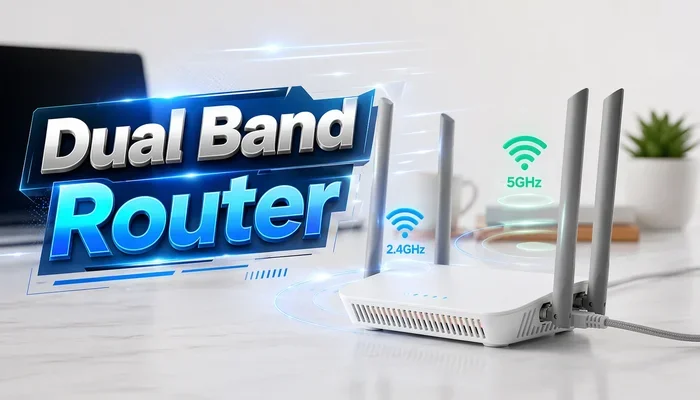
Most modern routers broadcast on two frequency bands. The 2.4 GHz band covers longer distances but has slower speeds. The 5 GHz band offers faster speeds but covers a shorter range.
If you are close to your router, switch to the 5 GHz band for the best performance. You can check your router settings or use the Wi Fi band settings to make this switch easily.
Choose the Right Channel
Your router can broadcast on different channels within each frequency band. If your neighbors are all using the same channel, there is congestion. This slows everyone down. Use a Wi Fi analyzer app to find the least crowded channel and set it manually in your router settings.
Update Your Router Firmware
Router manufacturers release firmware updates that fix bugs and improve performance. An outdated router can be a major bottleneck. Check your router’s admin panel for available updates and install them regularly.
Reposition Your Router
Physical placement matters more than most people realize. Keep your router in a central location, elevated off the floor, and away from walls and metal objects. Thick walls, microwaves, and even fish tanks can weaken your Wi Fi signal.
Consider a Wi Fi Extender or Booster
If your home is large or has dead zones, a Wi Fi booster can extend coverage and improve speeds in areas that are far from the router. You can learn more about boosters and whether they are worth it in our guide on buying a Wi Fi booster.
Check Your Internet Plan
Sometimes the problem is not your router at all. Your internet plan from your provider may simply be too slow for your needs. Run a speed test and compare the results to what your plan promises. If you consistently get lower speeds, contact your provider.
Reduce Network Congestion
Every device connected to your network uses a share of your bandwidth. If you have twenty devices streaming, gaming, and downloading at the same time, speeds will drop. Disconnect devices you are not using and prioritize critical devices through Quality of Service (QoS) settings.
Upgrade Your Router
Older routers simply cannot keep up with modern internet speeds. If your router is more than five years old, upgrading to a newer model with Wi Fi 6 or Wi Fi 6E support can transform your network performance.
Common Myths About Wi Fi Names and Speed
There are a lot of misconceptions floating around about Wi Fi names and how they relate to speed. Let us bust the most common ones.
Myth 1: A Shorter Name Loads Faster
Some people believe that a shorter SSID transmits faster because there is less data to send. This is not true. The SSID is transmitted in tiny packets that take microseconds to send. Whether your name is three characters or thirty characters makes absolutely no difference to speed.
Myth 2: Special Characters in the Name Boost Signal
You might have seen tips online suggesting that adding special characters or emojis to your network name somehow improves signal strength. This is completely false. Special characters can actually cause connection problems with some devices.
Myth 3: Changing the Name Resets Your Speed
Some users think that renaming the network acts like a reset button for speed. It does not. A name change does not clear caches, reset connections, or refresh any performance-related settings.
Myth 4: Your Wi Fi Name Affects Security
While a unique name can make it slightly harder for attackers to target your specific router model, the network name itself does not impact security. Your password and encryption type are what truly protect your network security.
What to Do If Your Speed Is Still Slow After a Name Change
If you have renamed your network and your speed is still not where you want it, do not panic. The problem lies elsewhere. Here is a quick troubleshooting checklist.
- Run a speed test using a reliable tool to measure your actual speeds.
- Restart your router by unplugging it for 30 seconds and plugging it back in.
- Check for interference from other electronics like cordless phones or baby monitors.
- Test with a wired connection to determine if the issue is with your Wi Fi or your internet plan.
- Contact your internet provider if wired speeds are also slow.
- Consider upgrading your equipment if your router or modem is outdated.
Sometimes the simplest fixes make the biggest difference. A quick reboot or moving your router to a better location can solve problems that seem complicated at first glance.
Remember, your Wi Fi name is just the face of your network. The real work happens behind the scenes in your router’s settings. Focus your energy there for meaningful speed improvements.
Final Thoughts
Changing your Wi Fi name is a simple, safe, and often satisfying process. It does not boost your internet speed, but it does improve organization, security, and usability of your wireless network. The real speed gains come from adjusting frequency bands, selecting less crowded channels, updating firmware, and optimizing router placement.
Use the name change as an opportunity to dig into your router settings. You might discover other tweaks that make a real difference. And if you ever need help extending your coverage, check out our guide on extending Wi Fi to 200 feet away for practical solutions that actually work.
Your network name is your network’s identity. Make it something you are proud of. And then focus on the settings that truly control how fast your data flows. With the right approach, you will enjoy a faster, more reliable Wi Fi experience every single day.
Frequently Asked Questions
Does renaming my Wi Fi network improve speed?
No, renaming your network does not directly improve speed. The SSID is just a label that identifies your network. However, the process of logging into your router to rename it may lead you to discover and adjust other settings that do improve performance.
Can a Wi Fi name affect my connection?
A Wi Fi name cannot affect your connection speed or stability. It only serves as an identifier for your wireless network. Connection quality depends on your router hardware, placement, frequency band, and channel settings.
What happens when I change my Wi Fi name?
When you change your network name, all connected devices will disconnect and need to reconnect using the new name. Your password remains the same unless you change it separately. No other network settings are affected.
Is it safe to change my Wi Fi network name?
Yes, it is completely safe. Changing your SSID is a routine maintenance task that all router users can perform. Just make sure you note your current settings before making changes so you can revert if needed.
How often should I change my Wi Fi name?
There is no need to change your Wi Fi name regularly. Do it when you set up a new router, move to a new location, or want to personalize your network. Frequent changes just reconnect your devices unnecessarily.
Does a Wi Fi name affect security?
A custom name adds a small layer of privacy by not revealing your router brand or model. However, your real security comes from a strong password and proper encryption settings like WPA3 or WPA2.
=== CONCLUSION ===
So, does changing your Wi Fi name affect speed? The answer is clear and simple. No, it does not. Your network name is just an identifier. It has no power to speed up or slow down your connection. But that does not mean you should skip renaming your network altogether. A good name improves usability, reduces connection errors, and adds a personal touch to your home setup.
The real secret to faster speeds lies in the settings behind the scenes. Switch to the right frequency band, pick a clear channel, update your firmware, and position your router wisely. These are the changes that deliver real results. And if you ever need to boost your upload speeds specifically, our guide on boosting upload speed has the tips you need.
Take control of your network today. Rename it if you want to, then focus on the settings that actually matter. Your faster, more reliable wireless network is just a few adjustments away.