Boost My Wifi Signal Through Walls With These Simple Tips
Struggling with weak wifi signal through walls? You can boost wifi signal through walls using smart router placement, the right hardware, and a few simple settings changes. These practical tips help you eliminate dead zones and enjoy a stronger wireless connection in every room.
Dealing with a weak wireless connection in another room is incredibly frustrating. You might have strong signal in the living room but nothing in the bedroom down the hall. The good news is that you can boost wifi signal through walls without spending a fortune or calling a technician. This guide walks you through every practical step you can take right now.
Walls are one of the biggest enemies of a strong wireless connection. Concrete, brick, and even thick drywall can weaken your wifi signal significantly. But here is the truth — most people do not need expensive equipment. A few simple changes to how you set up and manage your router can make a massive difference. Let us dive into the best ways to get a stronger signal everywhere in your home.
Key Takeaways
- Router placement matters: Centering your router and elevating it can dramatically improve signal strength through walls.
- Hardware upgrades help: Adding antennas, buying a Wi-Fi booster, or switching to a mesh system can solve stubborn signal problems.
- Frequency bands make a difference: 2.4 GHz penetrates walls better than 5 GHz, so choose wisely for each device.
- Software tweaks are free: Changing channels, updating firmware, and adjusting band settings cost nothing but yield real results.
- Obstacles weaken signals: Thick concrete, mirrors, and appliances block wifi signal, so know what to avoid.
- Mesh networks excel: A mesh router system provides seamless coverage even through multiple walls.
- Start simple: Free fixes like repositioning your router often solve the problem before you spend money.
📑 Table of Contents
- Why Your Wifi Signal Struggles Through Walls
- Best Router Placement Strategies
- Hardware Solutions To Boost Wifi Through Walls
- Software And Settings Adjustments
- Advanced Solutions For Tough Walls
- Quick Tips For Better Wifi Signal
- Common Mistakes People Make When Trying To Boost Wifi
- Expert Insights On Wall Penetration
- Conclusion
Why Your Wifi Signal Struggles Through Walls
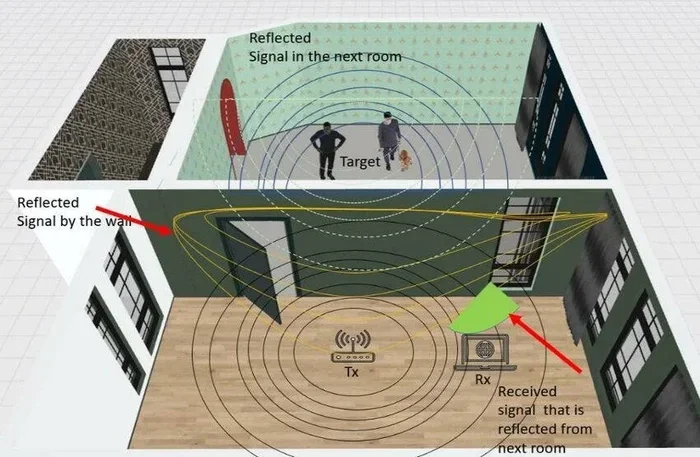
Understanding why walls kill your signal is the first step to fixing the problem. Wifi signals are radio waves, and just like any radio wave, they lose strength when they pass through solid objects. The thicker and denser the wall, the more signal it absorbs or blocks.
The Science Behind Wifi Signal Loss
Wifi routers broadcast radio frequency signals at either 2.4 GHz or 5 GHz. The 2.4 GHz band travels farther and penetrates walls better than 5 GHz. However, it also carries less data. The 5 GHz band is faster but struggles more with wall penetration. This is why your smart TV in the next room might buffer even when the speed test looks fine in the same room as the router.
Different materials block signals to different degrees. A standard drywall might only reduce signal by a small amount. But a concrete wall or a brick wall can cut your signal strength in half or more. Metal objects, mirrors, and even fish tanks can reflect or absorb wifi signals. This is why you might notice dead zones in certain parts of your home.
Common Culprits That Weaken Your Signal
Several household items and building materials are notorious for blocking wifi signals. Here are the worst offenders:
- Concrete and brick walls: These are the biggest signal killers in most homes.
- Large metal objects: Refrigerators, filing cabinets, and metal furniture can reflect signals away from their intended path.
- Mirrors and glass: They reflect wifi signals instead of letting them pass through.
- Water features: Fish tanks and indoor fountains absorb wifi signals surprisingly well.
- Thick insulation: Homes with heavy insulation between walls can block signals effectively.
- Appliances: Microwaves and baby monitors operate on similar frequencies and cause interference.
Once you understand what is blocking your signal, you can start working around it. The goal is to find the path of least resistance for your wireless signal to travel from the router to your devices.
Best Router Placement Strategies
Where you place your router has a huge impact on how well your wifi signal travels through walls. Moving your router to a better spot is the single most effective free fix you can make. Most people place their router in a corner or behind a piece of furniture without thinking about the consequences.
Center Your Router In Your Home
The ideal spot for your router is the center of your home. This gives the signal equal distance to travel in every direction. If your router is in the basement and you want strong signal on the second floor, the signal has to fight through multiple floors and walls. Moving it to a central location on the main floor changes everything.
Think of your router as a light bulb. A light bulb in the corner of a room illuminates one area well but leaves the rest in darkness. A light bulb in the center of the room lights up the whole space. Your wifi signal works the same way.
Elevate Your Router Off The Floor
Place your router on a shelf or table, not on the floor. Signals spread outward and downward from the antennae. When your router sits on the floor, a lot of the signal goes straight down into the carpet or concrete below where you do not need it. Elevating it by just a few feet improves coverage significantly.
Also, keep your router away from walls and corners. Signals do not travel well when they have to push through a wall immediately after leaving the router. Give your signal some open air to spread out before it hits any obstacles.
Avoid Common Placement Mistakes
Here are mistakes that hurt your signal more than you might think:
- Hiding your router in a closet: Closed doors and walls block the signal before it even reaches your home.
- Placing it behind a TV: The TV and its metal components create interference and block signals.
- Near microwaves or cordless phones: These devices operate on the 2.4 GHz frequency and cause interference.
- On the floor behind furniture: This blocks the signal from spreading properly.
- Next to large metal objects: Metal reflects wifi signals and sends them in the wrong direction.
Take a few minutes to look at your current router setup. Even moving it three feet in the right direction can improve your connection in rooms that previously had weak or no signal at all.
Hardware Solutions To Boost Wifi Through Walls
Sometimes free fixes are not enough, especially in homes with thick walls or multiple floors. Hardware solutions can make a dramatic difference in your signal strength and network coverage. Let us look at the best options.
Upgrade Your Router Antennae
Many routers come with small internal antennae that are not very powerful. If your router has external antennae, you can often replace them with higher-gain antennae that push the signal farther through walls. This is one of the simplest and most affordable upgrades you can make.
High-gain antennae focus the signal in specific directions rather than spreading it evenly in all directions. This means more signal reaches the rooms you actually use. If you want to add an antenna to my wifi router, check whether your router model supports external antenna upgrades first.
Use A Wifi Booster Or Extender
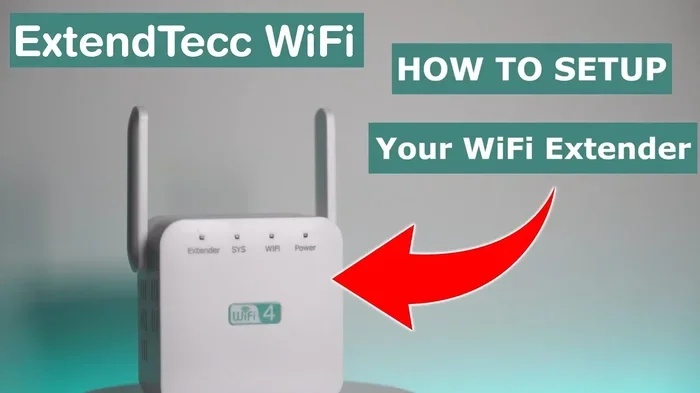
A wifi booster or extender picks up your existing signal and rebroadcasts it on the same network. Placing a booster halfway between your router and the weak-signal room can bridge the gap and push the signal through walls more effectively.
Boosters work best when placed where they still receive a strong signal from the router. If you place a booster in a dead zone, it has nothing strong to rebroadcast. Think of it as a relay runner — it needs a strong handoff to pass the signal forward.
If you are considering this route, learn more about buying a Wi-Fi booster to understand what features matter most for wall penetration.
Switch To A Mesh Network System
A mesh network system is the gold standard for whole-home wifi coverage. Instead of one router trying to push signal through every wall, a mesh system uses multiple nodes placed around your home. Each node talks to the others and creates a seamless network with strong signal everywhere.
Mesh systems are especially effective in homes with thick walls or multiple floors. The nodes work together to find the best path for your signal, automatically routing around obstacles. If you already have a router and want to expand coverage, you can connect a mesh router to an existing router in many cases.
Mesh systems are more expensive than boosters, but they provide a much better experience. They are easy to set up, and most come with apps that help you place each node in the optimal spot for maximum coverage.
Powerline Adapters As An Alternative
Powerline adapters use your home’s electrical wiring to carry internet from one room to another. You plug one adapter near your router and another in the room where you need better signal. This completely bypasses walls because the signal travels through your electrical system instead of the air.
Powerline adapters are not as fast as a direct ethernet connection, but they are much faster than a weak wifi signal. They work well in homes where walls are too thick for wireless signals to penetrate effectively.
Software And Settings Adjustments
You do not always need new hardware to improve your signal. Many router settings can be adjusted to get better wall penetration and stronger connections. These changes are free and can make a surprising difference.
Switch To The 2.4 GHz Band
If you have a dual-band router, it broadcasts on both 2.4 GHz and 5 GHz. The 2.4 GHz band travels farther and penetrates walls much better than 5 GHz. If you are struggling with signal in another room, switch your device to the 2.4 GHz network.
You will sacrifice some speed, but you will gain much better range and wall penetration. For basic tasks like browsing, email, and streaming standard definition video, 2.4 GHz is more than enough. Reserve 5 GHz for activities that need high speed and low latency, like gaming or 4K streaming, when you are close to the router.
Change Your Wifi Channel
Your neighbors might be using the same wifi channel as you, causing interference that weakens your signal. Most routers default to the same channel, so in dense neighborhoods, this is a common problem.
Log into your router settings and change the channel to one that is less crowded. You can use a free wifi analyzer app on your phone to see which channels are least used in your area. Switching to a less congested channel reduces interference and can significantly improve your signal strength through walls.
Update Your Router Firmware
Router manufacturers release firmware updates that improve performance and fix bugs. An outdated router might not be performing at its best. Check your router’s admin panel for firmware updates and install them regularly.
Firmware updates can improve how your router handles signal penetration and interference. They also often include security patches that protect your home network. This is a quick and easy step that many people overlook.
Adjust The Transmit Power
Many routers let you adjust the transmit power in the settings. Increasing the transmit power sends a stronger signal that can push through walls more effectively. However, this also increases heat output and can sometimes cause more interference.
Try increasing the power gradually and test your signal in weak spots. You might find that a small increase makes a big difference without causing any side effects.
Advanced Solutions For Tough Walls
Some homes have walls that are simply too thick or too dense for standard wifi signals to penetrate easily. In these cases, you need more aggressive solutions to boost wifi signal through walls.
Use Multiple Access Points
Access points are dedicated devices that connect to your network and broadcast wifi in specific areas. You can wire an access point to your router using an ethernet cable and place it on the other side of a thick wall. The access point then broadcasts a strong, dedicated signal in that area.
This is more work than a booster or extender because it requires running a cable, but the results are far superior. You get full-speed wifi on the other side of any wall without signal loss.
Consider MoCA Adapters
MoCA adapters use your home’s existing coaxial TV cables to create a high-speed wired network backbone. You can connect a MoCA adapter near your router and another near the area with weak signal, then plug in an access point or wifi extender at the second location.
This gives you a wired backhaul that is far more reliable than wireless repeaters. The signal travels through the coax cable, completely bypassing walls, and then broadcasts fresh wifi on the other side.
Hire A Professional For A Home Network Assessment
If you have tried everything and still have dead zones, it might be time to call in a professional. A network specialist can assess your home’s layout, identify the best placement for equipment, and install a custom solution that addresses your specific signal challenges.
Professional installation costs more upfront, but it ensures you get the right equipment in the right places. This is especially worth it in larger homes or homes with unusual layouts and very thick walls.
Quick Tips For Better Wifi Signal
Here are quick wins you can implement today to improve your wireless connection through walls:
- Restart your router regularly. A simple reboot clears cached data and refreshes the connection.
- Keep your router in the open. Do not hide it behind books or inside cabinets.
- Update your router drivers and firmware. This keeps everything running smoothly.
- Use a wifi analyzer app. Find the least congested channel for your area.
- Reduce interference. Move your router away from microwaves, baby monitors, and cordless phones.
- Use ethernet for stationary devices. Smart TVs and gaming consoles benefit from a wired connection, which frees up wifi bandwidth for mobile devices.
- Consider your internet plan. If your upload speed is slow, no amount of signal boosting will fix slow performance. Check your plan speed first.
These tips might seem small, but they add up. Many people see immediate improvement just by moving their router and changing their channel. Start with the free fixes before spending money on hardware.
Common Mistakes People Make When Trying To Boost Wifi
Avoid these mistakes that make the problem worse instead of better:
- Buying the most expensive router without checking your needs. A high-end router does not help if the problem is wall thickness, not router quality.
- Placing a booster in a dead zone. The booster needs a strong signal to rebroadcast. Place it where it still gets good signal from the router.
- Ignoring interference from other devices. Bluetooth devices, baby monitors, and microwaves all cause interference on the 2.4 GHz band.
- Not updating firmware. Old firmware can cause performance issues that are easily fixed with an update.
- Expecting one solution to fix everything. In many cases, you need a combination of placement changes, settings adjustments, and possibly hardware upgrades.
Knowing what not to do saves you time, money, and frustration. If your first attempt does not solve the problem, try combining two or three of the tips above for better results.
Expert Insights On Wall Penetration
Networking professionals agree that the biggest factor in wifi signal strength through walls is not the router — it is placement. The best router in the world will struggle if it is in the wrong location. Start with placement, then add hardware if needed.
Experts also recommend testing your signal before and after each change. Use a wifi speed test app on your phone to measure signal strength in each room. This gives you concrete data on what works and what does not. Without testing, you are just guessing.
Another expert tip is to think about your home’s layout. If you have a long hallway with rooms on both sides, place the router at one end of the hallway. The signal will travel down the hallway and reach rooms on both sides more effectively than if it were placed in a room at the end of the hall.
Conclusion
Boosting your wifi signal through walls is entirely achievable with the right approach. Start by optimizing your router placement — centering it in your home and elevating it off the floor. Then adjust your settings by switching to the 2.4 GHz band, changing channels, and updating firmware. If those free fixes are not enough, explore hardware solutions like antenna upgrades, wifi boosters, or a mesh network system.
Every home is different, so you might need to try a combination of these tips to find what works best for your situation. The key is to start simple and build up from there. With patience and the right strategy, you can eliminate dead zones and enjoy a strong, reliable wireless connection in every room of your home.
Do not let weak signal hold you back. Apply these tips today and feel the difference in your home network. Once you boost wifi signal through walls properly, you will wonder why you did not make these changes sooner.
Frequently Asked Questions
What is the best way to boost wifi signal through thick walls?
The most effective way is to use a mesh network system or place a wifi booster where it still receives a strong signal from the router. Mesh systems use multiple nodes to create seamless coverage, while boosters rebroadcast your existing signal to reach areas with thick walls that block the original signal.
Does changing the wifi channel really help with wall penetration?
Changing the channel does not directly help the signal penetrate walls better, but it reduces interference from neighboring networks. Less interference means a cleaner, stronger signal that can travel through walls more effectively. Use a wifi analyzer app to find the least congested channel in your area.
Is 2.4 GHz or 5 GHz better for getting through walls?
2.4 GHz is significantly better at penetrating walls than 5 GHz. The lower frequency travels farther and passes through solid objects more easily. While 5 GHz offers faster speeds, its range is shorter and it struggles more with wall penetration. Use 2.4 GHz for rooms farther from the router.
Can a wifi extender hurt my internet speed?
Yes, a poorly placed wifi extender can reduce your speed. Extenders rebroadcast the signal they receive, and if that signal is already weak, the rebroadcasted signal will be even weaker. Always place your extender where it receives a strong signal from the router to maintain good speeds.
How much does it cost to improve wifi signal through walls?
Many solutions are free, such as repositioning your router and changing settings. Hardware upgrades like wifi boosters cost between $20 and $100, while mesh systems range from $100 to $300 or more. Powerline adapters typically cost $30 to $70. You can start with free fixes and only spend money if needed.
Will a new router help if my walls are very thick?
A newer router with better technology can help, but it will not completely solve the problem if your walls are very thick. The best approach combines a quality router with smart placement and possibly a mesh system or access points. A new router alone may not be enough for homes with multiple thick walls blocking the signal.