Can You Use Alexa As A Bluetooth Speaker Without Wifi
Yes, you can use Alexa as a Bluetooth speaker without Wi-Fi, but with some important limitations. Your Alexa device can still pair with phones and other devices via Bluetooth even when offline. You will lose voice commands and smart features, but basic audio playback works fine. This guide covers everything you need to know about using Alexa offline.
Have you ever been in a situation where your Wi-Fi goes down and you still want to play music? Maybe you are at a party, and the router decides to take a break. Or perhaps you are camping and want some tunes without relying on a hotspot. Whatever the reason, the question can you use Alexa as a Bluetooth speaker without wifi comes up more often than you might think.
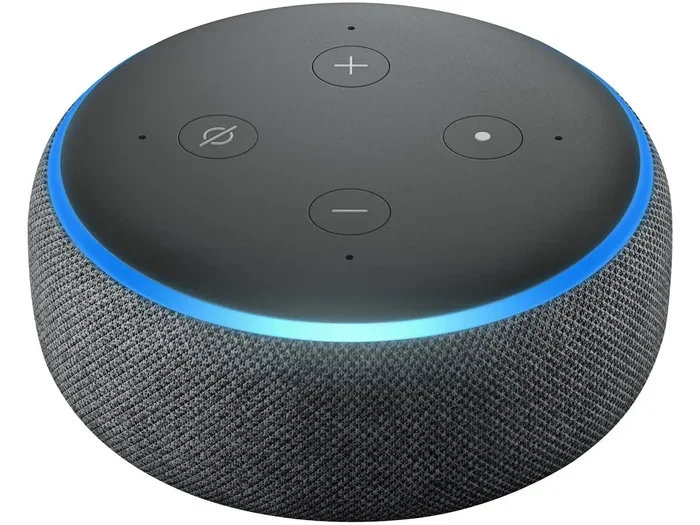
The good news is that Alexa devices support Bluetooth connections even without an active internet connection. This means your Echo, Echo Dot, or any other Alexa-enabled speaker can still act as a wireless speaker for your phone or tablet. However, there are some important things to know before you try this. Let us walk through everything step by step so you get the full picture.
In this article, we will cover how Bluetooth works on Alexa devices when offline, what you can and cannot do, and practical tips to get the best experience. Whether you are troubleshooting a Wi-Fi outage or planning for an offline event, this guide has you covered.
Key Takeaways
- Alexa supports Bluetooth pairing without Wi-Fi: You can still stream audio from your phone even when the internet is down.
- Voice commands stop working offline: Without Wi-Fi, Alexa cannot process your voice requests or answer questions.
- Bluetooth range is about 30 feet: Keep your phone close to the Alexa device for a stable connection.
- Some Alexa models work better offline: Echo devices with built-in Bluetooth handle this more smoothly than older models.
- You can still control volume and playback: Basic controls on the device itself remain functional without Wi-Fi.
- Reconnecting is simple: Once Wi-Fi returns, Alexa resumes all smart features automatically.
📑 Table of Contents
- How Bluetooth Works on Alexa Without Wi-Fi
- What You Can Do With Alexa Offline
- What You Cannot Do Without Wi-Fi
- Which Alexa Models Work Best Offline
- Tips for the Best Offline Bluetooth Experience
- Common Mistakes People Make When Using Alexa Offline
- How to Reconnect Alexa to Wi-Fi After Going Offline
- Comparing Alexa Offline Bluetooth vs. Other Offline Speaker Options
- Final Thoughts
How Bluetooth Works on Alexa Without Wi-Fi
Alexa devices have a built-in Bluetooth chip that operates independently of your Wi-Fi connection. This chip handles the wireless audio streaming between your phone and the speaker. When Wi-Fi is available, Alexa uses it for smart features like voice commands, music streaming from Amazon Music, and smart home controls. But the Bluetooth function does not depend on Wi-Fi at all.
Here is how it works in simple terms. Your phone sends audio data through a Bluetooth signal. The Alexa device receives that signal and plays the sound through its speakers. This process happens directly between the two devices. No internet is needed for this to work. Think of it like two walkie-talkies communicating with each other. They do not need a cell tower to talk.
However, the Bluetooth chip in your Alexa device still needs some power to function. And the audio quality may vary depending on your Alexa model. Newer Echo devices tend to have better Bluetooth antennas and speakers, which means a stronger and clearer connection. Older models may struggle with range or audio fidelity when used in Bluetooth-only mode.
Bluetooth Pairing Process Without Wi-Fi
Pairing your phone to an Alexa device without Wi-Fi is straightforward. First, make sure Bluetooth is turned on your phone. Then, say “Alexa, pair” or go to the Bluetooth settings on the device itself. Your phone should detect the Alexa device in its Bluetooth list. Tap on it to connect. That is it. You are now streaming audio without Wi-Fi.
If you have used Alexa as a Bluetooth speaker before, this process will feel very familiar. The main difference is that you will not be able to use voice commands to control playback. You will need to use your phone’s media controls instead.
What You Can Do With Alexa Offline
When Alexa is connected to your phone via Bluetooth but has no Wi-Fi, you can still do several useful things. Understanding these capabilities helps set realistic expectations.
Stream Music From Your Phone
The primary use of Alexa as a Bluetooth speaker without Wi-Fi is playing music stored on your phone. You can open Spotify, Apple Music, YouTube, or any other app on your device and stream it to Alexa. The audio goes directly from your phone to the speaker through the Bluetooth link.
This is great for parties or gatherings where you do not want to rely on internet-based music services. You can also play downloaded music files from your phone. Since the audio is coming from your device, the quality depends on both your phone’s audio output and the Alexa speaker’s hardware.
Control Playback Using Physical Buttons
Even without Wi-Fi, you can use the buttons on your Alexa device to control playback. You can pause, play, skip tracks, and adjust volume. These basic controls work because they are handled locally on the device. You do not need an internet connection to tell Alexa to turn up the volume.
Use Alexa as a Hands-Free Speakerphone
You can also use Alexa for phone calls when connected via Bluetooth without Wi-Fi. If someone calls you on your phone, the call audio can route through the Alexa speaker. This works because phone calls use your cellular network, not Wi-Fi. So even if your internet is down, you can still take calls through your Alexa device.
This feature is especially handy if you are using Alexa in a workshop or garage where your phone might be across the room. Bluetooth calling on speakers works on a similar principle, just with different hardware.
What You Cannot Do Without Wi-Fi
While Bluetooth playback works offline, there are significant limitations. Knowing these ahead of time prevents frustration.
Voice Commands Stop Working
This is the biggest limitation. Without Wi-Fi, Alexa cannot process your voice commands. The audio from your voice needs to travel to Amazon’s cloud servers for processing. No internet means no cloud processing. So saying “Alexa, play jazz” or “Alexa, next song” will not work.
You will need to use your phone or the Alexa device buttons to control playback. This takes a bit of getting used to if you are accustomed to hands-free control.
No Smart Home Controls
All smart home features require Wi-Fi. You cannot turn on lights, adjust thermostats, or check camera feeds through Alexa when offline. The Bluetooth connection only handles audio streaming. It does not carry smart home commands.
No Amazon Music or Audible Streaming
Amazon Music, Audible, and other Amazon services require an internet connection. You cannot stream from these services without Wi-Fi, even if Alexa is connected to your phone via Bluetooth. You can, however, play local files stored on your device.
No Skills or Third-Party Integrations
Alexa Skills and third-party app integrations all rely on the internet. News updates, weather forecasts, jokes, and flash briefings will not work offline. Alexa essentially becomes a dumb Bluetooth speaker in this mode.
Which Alexa Models Work Best Offline
Not all Alexa devices are created equal when it comes to Bluetooth performance without Wi-Fi. Here is a quick look at how different models handle offline Bluetooth mode.
| Alexa Model | Bluetooth Range | Audio Quality Offline | Ease of Pairing |
|---|---|---|---|
| Echo (4th Gen) | 30+ feet | Excellent | Very Easy |
| Echo Dot (5th Gen) | 25-30 feet | Good | Very Easy |
| Echo Show 10 | 30+ feet | Very Good | Easy |
| Echo Dot (3rd Gen) | 20-25 feet | Fair | Easy |
| Echo Dot (1st/2nd Gen) | 15-20 feet | Basic | Moderate |
Newer Echo models have improved Bluetooth antennas and better speakers. This means you get a stronger connection and better sound quality when using Alexa offline. If you plan to use Alexa as a Bluetooth speaker frequently without Wi-Fi, investing in a newer model is worth it.
Also worth noting, some Echo devices like the Echo Studio have premium audio hardware that really shines even in Bluetooth-only mode. The offline experience on these devices is surprisingly good. If you are comparing options, you might also want to check out how you can turn a regular stereo into a Bluetooth speaker for a similar offline audio experience.
Tips for the Best Offline Bluetooth Experience
Getting the most out of Alexa as a Bluetooth speaker without Wi-Fi is not hard. A few simple tips make a big difference.
Keep Your Phone Close
Bluetooth has a limited range, typically about 30 feet. Walls, furniture, and other obstacles can weaken the signal. Keep your phone within a reasonable distance from the Alexa device for the best connection. If you notice audio cutting out, move closer.
Charge Both Devices
Bluetooth streaming uses more battery on both your phone and the Alexa device. Make sure both are fully charged before an offline event. If you are using a portable Echo device like the Echo Pop or Echo Dot, keep it plugged in if possible.
Download Music Before You Go Offline
If you know you will be without Wi-Fi, download your favorite playlists or podcasts to your phone beforehand. This way, you can still enjoy your content even when there is no internet. Most music apps have an offline download feature.
Use the Alexa Device Buttons for Control
Since voice commands will not work offline, familiarize yourself with the physical controls on your Alexa device. Knowing which button pauses, skips, or adjusts volume saves you from fumbling with your phone every time.
Reset Bluetooth If Connection Fails
If your phone and Alexa device refuse to pair, try turning Bluetooth off and on again on both devices. You can also try removing the Alexa device from your phone’s Bluetooth list and pairing fresh. Sometimes a simple reset solves the problem.
Common Mistakes People Make When Using Alexa Offline
Avoid these common pitfalls to ensure a smooth offline Bluetooth experience with your Alexa device.
- Assuming voice commands work offline: They do not. Alexa needs Wi-Fi to understand and process your voice.
- Standing too far away: Bluetooth range is limited. Stay within 30 feet for a stable connection.
- Forgetting to download content: Without Wi-Fi, you cannot stream from cloud services. Download music or podcasts beforehand.
- Ignoring battery levels: Bluetooth streaming drains batteries faster. Keep both devices charged.
- Expecting smart features to work: Smart home controls, skills, and flash briefings all require internet. Alexa becomes a basic speaker offline.
- Not unpairing old devices: If your Alexa is still connected to a previously paired device, it may not connect to your current phone easily. Clear old Bluetooth pairings regularly.
One mistake people often make is confusing the Bluetooth transmitter on their phone with the receiver on Alexa. Your phone acts as the transmitter, sending audio to Alexa. If your phone’s Bluetooth is weak or outdated, the connection suffers. This is similar to how a Bluetooth transmitter in a car depends on both the transmitter and receiver working well.
How to Reconnect Alexa to Wi-Fi After Going Offline
When your Wi-Fi comes back, Alexa should automatically reconnect. However, sometimes it needs a little help. Here is how to get things running again smoothly.
- Check that your Wi-Fi router is working and your internet connection is active.
- Say “Alexa, reconnect to Wi-Fi” or go to the Alexa app on your phone.
- In the Alexa app, navigate to Devices, then select your Echo device.
- Tap on Settings and choose Wi-Fi Setup.
- Follow the on-screen prompts to reconnect to your network.
- Once connected, Alexa will resume all smart features automatically.
After reconnecting, your Alexa device will go back to being a full smart speaker. Voice commands, smart home controls, and all skills will work again. The Bluetooth connection to your phone may disconnect automatically, or you may need to manually switch back to Bluetooth mode if you want to continue using it offline.
Comparing Alexa Offline Bluetooth vs. Other Offline Speaker Options
There are other ways to play audio offline besides using Alexa. Let us compare a few options.
Alexa Bluetooth Mode vs. Portable Bluetooth Speakers
Portable Bluetooth speakers like JBL or Bose are designed specifically for wireless audio playback. They do not need Wi-Fi and often have better battery life and portability than Echo devices. However, they lack the smart features of Alexa. If you only need a speaker for offline use, a portable Bluetooth speaker might be a better choice.
On the other hand, if you already own an Alexa device, using it as a Bluetooth speaker without Wi-Fi is a great way to get more value out of it. You do not need to buy a separate speaker just for offline use.
Alexa Bluetooth Mode vs. AUX Cable Connection
Some Alexa devices have a 3.5mm audio jack. You can connect your phone directly with an AUX cable for offline playback. This gives you a more stable connection than Bluetooth and no battery drain on your phone from Bluetooth. However, you lose the wireless convenience. Using Bluetooth to turn a car radio into a wireless speaker is a similar trade-off between convenience and connection stability.
Final Thoughts
Using Alexa as a Bluetooth speaker without Wi-Fi is not only possible but also quite practical. Whether you are dealing with an internet outage, planning an outdoor event, or simply want to save on data usage, your Alexa device can serve as a reliable wireless speaker. The key is understanding what works and what does not in offline mode.
You can stream music from your phone, take phone calls, and control basic playback. You just cannot use voice commands or access smart features. Keep your phone close, download content beforehand, and keep your devices charged. With these simple steps, your Alexa device becomes a capable Bluetooth speaker even without an internet connection.
So the next time your Wi-Fi goes down, do not panic. Your Alexa device still has plenty to offer. Just pair your phone via Bluetooth and keep the music playing. It is one of those features that makes Alexa devices surprisingly versatile beyond their smart capabilities.
If you are exploring Bluetooth options for other devices, you might also find our guide on using a Bluetooth adapter on your TV helpful for expanding your wireless audio setup even further.
Frequently Asked Questions
Can Alexa connect to Bluetooth without Wi-Fi?
Yes, Alexa devices can connect to Bluetooth without Wi-Fi. The Bluetooth chip in Alexa works independently of your internet connection. You can pair your phone and stream audio even when there is no Wi-Fi available. Just keep in mind that voice commands will not work offline.
How do I pair my phone to Alexa without Wi-Fi?
Turn on Bluetooth on your phone. Then say “Alexa, pair” or go to the Bluetooth settings on your Alexa device. Your phone should detect the Alexa device in its Bluetooth list. Tap to connect and start streaming audio.
Can I use voice commands with Alexa when there is no Wi-Fi?
No, voice commands require Wi-Fi. Alexa sends your voice to Amazon’s cloud servers for processing. Without internet, Alexa cannot understand or respond to your voice. You will need to use your phone or the physical buttons on the Alexa device to control playback.
Does Bluetooth work on all Alexa devices?
Most Alexa devices support Bluetooth, including Echo, Echo Dot, Echo Show, and Echo Studio models. Very old or basic models may have limited or no Bluetooth capability. Check your specific device’s specifications if you are unsure.
Can I use Alexa as a speakerphone without Wi-Fi?
Yes, you can use Alexa for phone calls without Wi-Fi. Phone calls use your cellular network, not Wi-Fi. As long as your phone has signal, incoming calls can route through your Alexa speaker via Bluetooth. This works even when your internet is completely down.
What happens to Alexa when Wi-Fi comes back after being offline?
When Wi-Fi returns, Alexa automatically reconnects to your network. All smart features, voice commands, and skills resume working again. The Bluetooth connection to your phone may stay active or disconnect depending on the device settings. You can switch between Bluetooth and Wi-Fi modes as needed.
=== CONCLUSION ===
Using Alexa as a Bluetooth speaker without Wi-Fi is a practical and useful feature that many people overlook. Your Echo device is not just a smart speaker, it is also a capable Bluetooth speaker that works independently of the internet. You can stream music, take calls, and control playback using your phone or device buttons even when the Wi-Fi is down.
The main trade-off is losing voice commands and smart features. But for basic audio playback, Alexa handles this role well. Keep your phone close, download content beforehand, and manage your expectations. With these simple steps, you can enjoy uninterrupted audio from your Alexa device no matter what happens with your internet connection.
Next time someone asks you can you use Alexa as a Bluetooth speaker without wifi, you will know the answer is a confident yes. Share this guide with friends who might benefit from knowing how versatile their Alexa device really is.