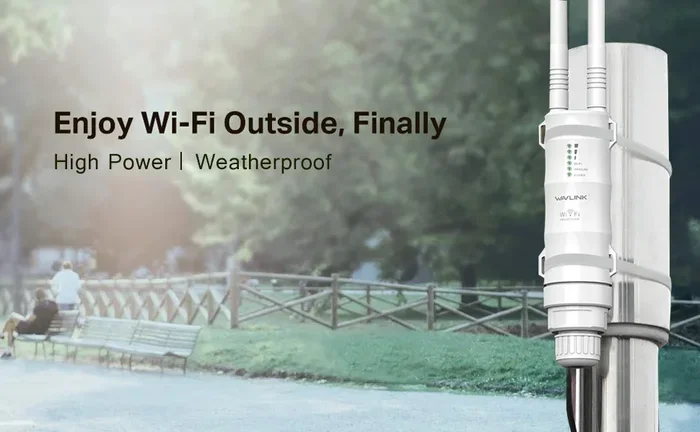
How Can I Boost My Public Wifi Signal for Everyone
Boosting your public wifi signal is easier than you think. Whether you are at a cafe, airport, or hotel, a weak connection can ruin your day. This guide covers simple fixes, gear recommendations, and expert tricks to get you online faster and stronger.
You have probably been there. You sit down at a coffee shop, open your laptop, and try to load a webpage. The loading wheel spins forever. Your public wifi signal is weak, and frustration sets in fast. Weak public wifi is a problem for millions of people every single day.
The good news is that you do not have to just sit there and suffer. There are real, practical ways to boost your public wifi signal and get the speed you need. Whether you are working remotely, traveling, or just killing time at an airport, this guide will show you exactly what to do. Let us dive in and fix your connection problems for good.
A strong public wifi signal depends on several factors working together. The router itself, your device settings, physical obstacles, and even the number of people sharing the network all play a role. By understanding these factors, you can take control of your connection and enjoy faster, more reliable internet wherever you go.
Key Takeaways
- Router placement matters: Moving closer to the router or finding a clear line of sight can dramatically improve your public wifi signal.
- Use a wifi booster: A dedicated Wi-Fi booster can amplify weak signals and extend your range in public spaces.
- Switch to the right frequency band: Choosing 2.4 GHz over 5 GHz often gives you better range in crowded public areas.
- Reduce interference: Avoiding crowded channels and nearby electronic devices helps stabilize your public hotspot connection.
- Consider a mesh setup: A mesh router system can blanket large areas with strong signal.
- Update your device settings: Keeping your wireless adapter and drivers current ensures you get the best possible performance.
📑 Table of Contents
- Why Public Wifi Signals Are Often Weak
- Simple Fixes to Boost Your Public Wifi Signal
- Hardware Solutions for Stronger Public Wifi
- Software and Settings Tweaks for Better Performance
- How to Extend Your Wifi Range in Public Spaces
- Quick Tips for the Best Public Wifi Experience
- Common Mistakes People Make With Public Wifi
- Expert Insights on Public Wifi Optimization
- Key Takeaways
- Conclusion
Why Public Wifi Signals Are Often Weak
Public wifi networks are different from your home setup. They are designed to serve dozens or even hundreds of people at once. That means the signal gets split thin. Here are the main reasons public wifi signals struggle.
Network Congestion
When a coffee shop fills up, everyone shares the same bandwidth. The more devices connected, the slower the connection becomes for each person. This is called network congestion. It is the number one reason public wifi feels slow during peak hours.
Distance from the Router
Public routers are often placed in a central location or tucked away in a corner. If you are sitting far from the router, the signal has to travel through walls, furniture, and other obstacles. The farther you are, the weaker your public wifi signal becomes.
Physical Obstacles
Concrete walls, metal structures, and even large appliances can block or weaken wifi signals. In public spaces like malls or airports, the building materials themselves work against you. Thick walls and long corridors create dead zones where the signal barely reaches.
Outdated Equipment
Many businesses use older routers that do not support the latest wifi standards. An outdated router cannot deliver the speeds modern devices expect. This creates a bottleneck even if the signal reaches your device clearly.
Simple Fixes to Boost Your Public Wifi Signal
Before you buy any equipment, try these free and easy fixes. Many of these solutions take just a few minutes and can make a big difference.
Move Closer to the Router
This sounds obvious, but it works. If you are sitting in the far corner of a cafe, try moving to a seat closer to the router. Even a few extra feet can improve your signal strength significantly. Look for a spot with a clear line of sight to the router if possible.
Restart Your Device
Sometimes the simplest fix is the best one. Restarting your phone, tablet, or laptop clears temporary network glitches and forces your device to reconnect fresh. This alone can boost your public wifi signal and improve speed.
Forget and Reconnect to the Network
Go to your wifi settings and forget the network. Then reconnect from scratch. This forces your device to find the strongest available channel and re-establish a clean connection. It is especially helpful when the network has been acting unstable for a while.
Turn Off Unused Connections
If your device has multiple active connections, it may be fighting with itself. Turn off bluetooth, mobile data, and any other wireless connections you are not using. This lets your device focus all its power on the public wifi signal and can boost performance.
Update Your Device Software
Outdated operating systems and network drivers can cause weak signals and slow speeds. Make sure your device is running the latest software updates. These updates often include fixes for wireless connectivity issues and improvements to wireless signal strength.
Hardware Solutions for Stronger Public Wifi
When simple fixes are not enough, it is time to bring in some gear. The right hardware can transform your public wifi experience entirely.
Use a Wifi Booster
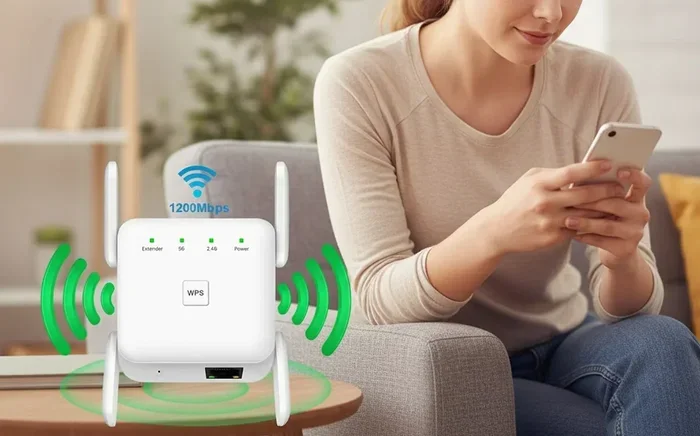
A wifi booster is one of the most effective tools for strengthening weak signals. These small devices plug into a USB port or sit on a table and amplify the existing wifi signal. They are compact, affordable, and easy to use. A good Wi-Fi booster can make the difference between a usable connection and an unusable one.
When choosing a booster, look for one that supports both 2.4 GHz and 5 GHz bands. This gives you flexibility to switch between range and speed depending on your needs. Some boosters also come with built-in antennas for extra signal gain.
Add an External Antenna
If your device allows it, adding an external antenna can dramatically improve signal reception. Many laptops and tablets have internal antennas that are not very powerful. An external antenna connects via USB and picks up signals much more effectively.
Check if your device supports antenna upgrades before purchasing one. Some routers also accept external antennas, which can help if you have access to the router itself. A high-gain antenna focuses the signal in a specific direction, which is perfect for targeting a distant router.
For more details on antenna upgrades, check out our guide on adding an antenna to your wifi router for home setups that apply similar principles.
Set Up a Mesh Network
A mesh network uses multiple nodes to create a seamless web of wifi coverage. This is ideal for large public spaces or venues where a single router cannot reach everywhere. Each mesh node acts as a mini router, extending the signal further.
Setting up a mesh router system may sound complex, but modern mesh systems are designed for easy setup. You place one node near the main router and distribute others around the space. The result is consistent, strong coverage throughout the area.
Use a Portable Hotspot Instead
When public wifi is just too weak or unreliable, consider using a portable hotspot. These devices create their own private network using cellular data. They give you full control over your connection speed and stability.
Portable hotspots work well for travelers and remote workers who cannot rely on public networks. They are small enough to fit in your pocket and provide a secure connection wherever you go. If you are interested in learning more about portable options, our article on buying your own portable wifi covers the best choices available.
Software and Settings Tweaks for Better Performance
Not every solution requires buying new hardware. Sometimes a few settings changes on your device can unlock a stronger, faster connection.
Switch Between 2.4 GHz and 5 GHz Bands
Most modern devices support two wifi frequency bands: 2.4 GHz and 5 GHz. The 2.4 GHz band offers a longer range but slower speeds. The 5 GHz band offers faster speeds but a shorter range. In a public setting, the 2.4 GHz band often performs better because it can reach farther through walls and obstacles.
If your device automatically connects to 5 GHz and the signal is weak, try switching to 2.4 GHz manually. You may be surprised at how much stronger and more stable your connection becomes. For more information on managing frequency bands, see our guide on changing your wifi from 5GHz to 2.4GHz.
Change Your Dns Settings
Your DNS server affects how quickly websites load, even if the wifi signal is strong. Switching to a faster public DNS like Google DNS or Cloudflare DNS can speed up your browsing experience. This is a free and instant fix that works on any device.
Disable Power Saving Mode for Wifi
Many devices have a power-saving mode that limits wifi performance to conserve battery. Disabling this feature allows your wireless adapter to use full power for signal reception. Go to your device settings and look for wifi power management options. Turning this off can noticeably improve your connection stability in public spaces.
Clear Your Network Cache
Over time, your device stores data about past network connections. This cache can become corrupted and cause connection problems. Clearing it forces your device to build fresh network profiles and can resolve many signal-related issues.
How to Extend Your Wifi Range in Public Spaces
Sometimes the problem is not the signal strength but the range. Public spaces can be large, and the router simply cannot reach every corner. Here are strategies for extending your effective range.
Position Yourself Strategically
Survey the space before settling in. Look for the router or ask staff where it is located. Choose a seat that minimizes the distance and obstacles between you and the router. Even small adjustments in your seating position can lead to noticeable improvements in wifi coverage.
Use a Range Extender
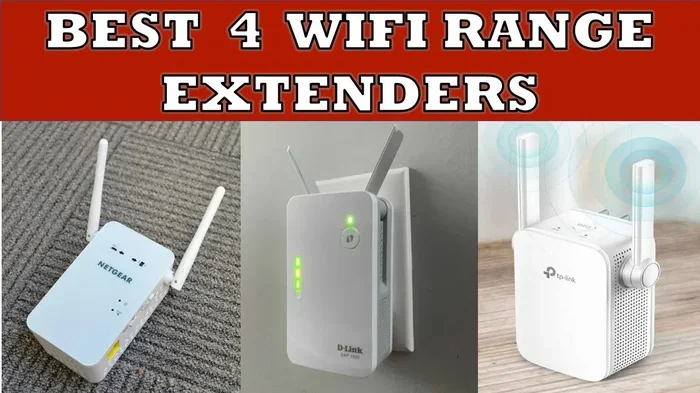
A range extender picks up the existing signal and rebroadcasts it further. This is a simple plug-and-play solution that works in most environments. Place the extender halfway between the router and your location for the best results.
If you want to learn more about extending wifi range, our article on extending your Wi-Fi to 200 feet away covers detailed techniques that apply to both home and public setups.
Reduce Interference From Other Devices
Bluetooth devices, microwaves, and other electronics can interfere with your wifi signal. In a crowded public space, there may be dozens of devices competing for the same frequencies. Moving away from these sources of interference can help your connection stay strong and stable.
Quick Tips for the Best Public Wifi Experience
- Arrive early: The fewer people on the network, the better your signal and speed will be.
- Use an ethernet adapter: Some public venues offer wired connections. An ethernet adapter can give you the fastest, most stable connection possible.
- Download offline content: When you know you will be in a weak signal area, download what you need ahead of time.
- Use a vpn wisely: A VPN can sometimes slow your connection, but it also protects your data on public networks. Use one that is lightweight and fast.
- Keep your device charged: Searching for a stronger signal drains battery quickly. Keep your device charged or bring a portable charger.
- Try different apps: Some apps are heavier than others. If your connection is weak, use lighter apps that require less bandwidth.
Common Mistakes People Make With Public Wifi
Avoid these common pitfalls that make your public wifi experience worse than it needs to be.
- Assuming all seats are equal: Not every spot in a cafe or airport has the same signal strength. A few steps can make a huge difference.
- Ignoring network settings: Leaving your device on default settings often means missing opportunities to optimize your connection.
- Not updating your drivers: Outdated wireless adapters cannot perform at their best. Keep your drivers up to date for the best network performance.
- Overloading the network: Running multiple heavy downloads or streams at once can overwhelm both your device and the public network.
- Skipping security steps: Public networks are convenient but risky. Always use a VPN and avoid accessing sensitive accounts when possible.
Expert Insights on Public Wifi Optimization
Networking professionals agree that public wifi optimization comes down to a combination of smart positioning, the right equipment, and proper device settings. According to industry experts, the single most impactful change most people can make is to switch to the 2.4 GHz band when in public spaces. This band penetrates walls and travels farther than 5 GHz, making it ideal for crowded venues.
Experts also recommend carrying a small, portable wifi signal amplifier in your bag. These devices are lightweight and can turn a weak, unusable signal into a workable connection in seconds. For those who frequently rely on public networks, investing in a quality amplifier or booster pays for itself many times over.
Another expert tip is to always check for firmware updates on your devices. Manufacturers regularly release updates that improve wireless performance and fix connectivity bugs. A simple update can sometimes solve signal problems that have been bothering you for weeks.
Key Takeaways
- Understanding the problem: Public wifi signals are weak because of congestion, distance, obstacles, and outdated equipment.
- Free fixes work: Moving closer, restarting your device, and switching frequency bands can all improve your connection without spending a dime.
- Hardware helps: A wifi booster, external antenna, or mesh system can transform your public wifi experience.
- Settings matter: Tweaking DNS, disabling power saving mode, and clearing network cache are quick wins that boost performance.
- Extend your range: Range extenders and strategic positioning help you get signal in hard-to-reach areas of public spaces.
- Avoid common mistakes: Don’t assume every seat is the same, keep your drivers updated, and protect your data with a VPN.
- Carry the right gear: A portable booster or signal amplifier in your bag ensures you are prepared for weak connections anywhere.
Conclusion
A weak public wifi signal does not have to ruin your day. With the right knowledge and a few simple tools, you can turn a frustrating connection into a fast, reliable one. Start with the free fixes like moving closer to the router and switching to the 2.4 GHz band. If those are not enough, consider investing in a wifi booster or external antenna. These small changes add up to a big improvement in your everyday connectivity.
Remember, the best connection is the one that works for you. Whether you are working from a cafe, waiting at an airport, or relaxing in a hotel lobby, you now have the tools to get the most out of any public wifi network. Try these tips today and notice the difference for yourself.
Stay connected, stay productive, and never let a weak signal slow you down again. The power to boost your public wifi signal is in your hands.
Frequently Asked Questions
Why is public wifi so slow compared to home wifi?
Public wifi networks serve many users at once, which splits the available bandwidth. The router may also be outdated or poorly positioned. These factors combine to make public connections feel much slower than your home setup.
Can a wifi booster really improve my public wifi signal?
Yes, a quality wifi booster can significantly amplify weak signals and extend your range. It works by receiving the existing signal and rebroadcasting it at a stronger strength. This is one of the most effective hardware solutions for improving public wifi performance.
Is it safe to use public wifi networks?
Public wifi networks can be risky because they are open and shared. Always use a VPN to encrypt your data, avoid accessing banking or sensitive accounts, and make sure your device firewall is active. These precautions keep you safe while using public connections.
What is the best frequency band for public wifi?
The 2.4 GHz band is usually better for public wifi because it travels farther and penetrates walls more effectively than 5 GHz. While 5 GHz offers faster speeds, its shorter range makes it less reliable in crowded public spaces.
How can I find the best seat for wifi at a cafe or airport?
Look for the router first, then choose a seat as close as possible with a clear line of sight. Avoid sitting near thick walls, metal structures, or busy kitchen areas. Even moving a few seats can noticeably improve your signal strength and speed.
Do I need special equipment to boost public wifi?
Not necessarily. Many free software tweaks like switching frequency bands, updating drivers, and changing DNS settings can improve your connection. However, for consistently weak signals, a portable wifi booster or external antenna can make a real difference.