How Can I Extend My Wifi Range To 100 Yards Fast
Extending your WiFi range to 100 yards is totally doable with the right approach. You can use mesh routers, WiFi extenders, better antennas, and smart placement to kill dead zones. This guide walks you through every fast and affordable method so you get strong wireless coverage across your entire property.
Have you ever walked to the far end of your yard and watched your WiFi signal drop to nothing? It is frustrating when your wireless signal can’t reach your garden, garage, or backyard shed. You are not alone. Many homeowners struggle with WiFi dead zones that make outdoor connectivity impossible.
The good news is that you do not need to be a tech genius to fix this. Whether you want to stream music on your patio, check your security cameras out back, or just browse the web by the pool, there are real ways to push your home network to 100 yards and beyond. In this guide, I will walk you through every method that actually works, from free quick fixes to gear upgrades that deliver serious results.
Let us get into it. No fluff, no jargon, just practical steps you can start today.
Key Takeaways
- Mesh systems are the best solution: They blanket large areas with seamless WiFi and are easy to set up.
- Router placement matters a lot: Moving your router to a central, elevated spot can instantly improve range.
- WiFi extenders and repeaters work: They boost your existing signal at a low cost, though they may cut speed slightly.
- Upgrading your antenna helps: A high-gain antenna can push your signal much farther without buying new gear.
- Switching to 2.4 GHz frequency extends range: It travels farther than 5 GHz, even if speeds are a bit slower.
- DIY tricks like aluminum reflectors work: Simple hacks can focus your signal in the direction you need.
- Check for interference: Microwaves, walls, and other electronics can weaken your signal significantly.
📑 Table of Contents
- Why Your WiFi Signal Loses Strength Over Distance
- Free and Quick Fixes That Actually Work
- Use a WiFi Range Extender or Repeater
- Upgrade to a Mesh WiFi System
- Upgrade Your Router Antenna
- Optimize Your Frequency Band and Settings
- DIY Tricks to Boost Your Signal for Free
- Outdoor Access Points for Maximum Range
- Common Mistakes That Kill Your WiFi Range
- Quick Tips for the Best Results
- Conclusion
Why Your WiFi Signal Loses Strength Over Distance
Before we dive into solutions, it helps to understand why your signal fades. WiFi signals are radio waves, and they weaken as they travel through space. Walls, trees, furniture, and even the weather can absorb or block the signal. The farther the signal has to go, the weaker it gets.
Most home routers are designed for indoor use. They typically cover about 1,500 square feet under ideal conditions. But 100 yards is roughly 300 feet. That is way beyond what a standard router can handle on its own. This is where WiFi range extenders, mesh systems, and other tools come in.
Two things affect your signal the most: frequency band and obstacles. A 2.4 GHz frequency signal travels farther than a 5 GHz signal, but it is slower. The 5 GHz band gives you faster speeds but has a much shorter range. Understanding this tradeoff is key to choosing the right solution.
Free and Quick Fixes That Actually Work
Before you spend a single dollar, try these simple tweaks. Many of them cost nothing and can make a surprising difference in your signal strength.
Move Your Router to a Central Location
This is the single most impactful thing you can do. Most people tuck their router in a corner, behind a TV, or in a closet. That kills the signal before it even leaves the room. Move your router to a central, elevated spot in your home. A shelf or a table works great. The higher up it is, the better it can broadcast downward and outward.
Think of your router like a flashlight. If you hold it in the corner of a room, half the light hits the wall. But if you hold it in the center, the light spreads much more evenly. The same idea applies to wireless connectivity.
Change Your WiFi Channel
Your neighbors might be using the same WiFi channel as you, causing interference. This is especially common in apartment buildings or crowded neighborhoods. Use a free app like WiFi Analyzer to find the least congested channel and switch your router to it. This simple change can reduce interference and boost your effective network range.
Update Your Router Firmware
Router manufacturers release firmware updates that improve performance and fix bugs. Check your router’s admin panel to see if an update is available. It takes about five minutes and can sometimes improve signal quality noticeably.
Use a WiFi Range Extender or Repeater
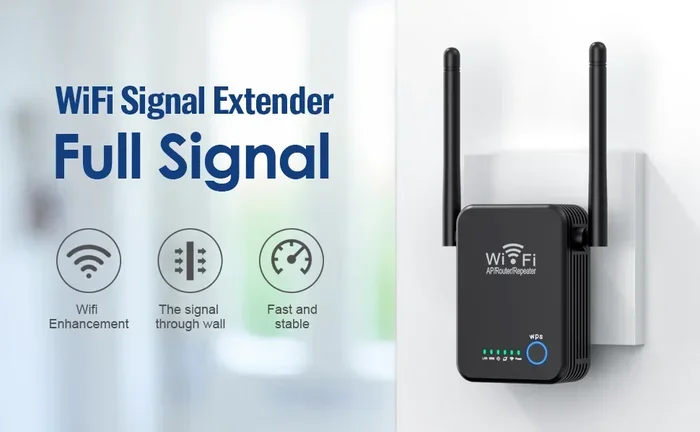
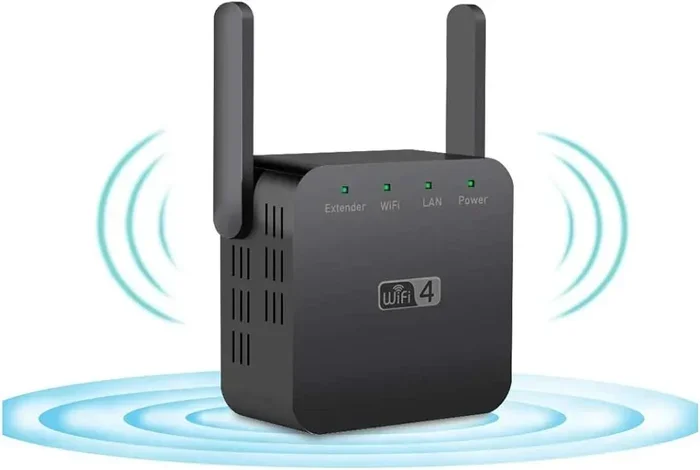
A WiFi range extender is one of the easiest and most affordable ways to push your signal farther. It picks up your existing WiFi and rebroadcasts it to areas your router cannot reach. Think of it as a relay runner passing the baton to cover more ground.
You can find decent WiFi extenders for under $50. They plug directly into a wall outlet and require minimal setup. The main tradeoff is that extenders usually cut your speed by about half, because they use the same radio to receive and send data.
If you want a more robust solution, check out Can I Get A Extension On My Wi Fi for a deeper look at extension options and what works best for different setups.
Where to Place Your Extender
Placement is everything with a WiFi extender. Do not place it at the edge of your dead zone. Instead, put it about halfway between your router and the area you want to cover. That way, it gets a strong signal from the router and then rebroadcasts it with full power.
For example, if your router is in the living room and you want coverage in the backyard, place the extender somewhere in the middle, like a hallway or a back room. This ensures the extender has enough signal to amplify and push toward 100 yards.
Upgrade to a Mesh WiFi System
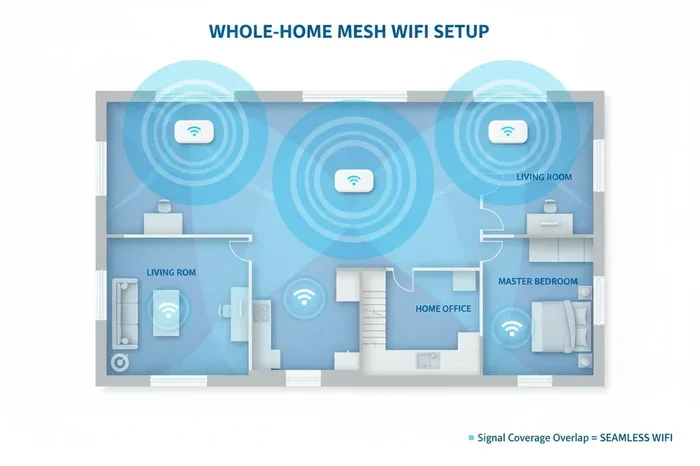
If you want the best possible wireless signal boost, a mesh WiFi system is the way to go. Unlike traditional routers or extenders, a mesh system uses multiple nodes placed around your property. Each node talks to the others and creates one seamless network. You do not have to switch networks as you walk around.
Mesh systems are perfect for large properties. They are designed to handle long-range WiFi and can easily cover 100 yards or more when nodes are placed strategically. Brands like Google Nest WiFi, TP-Link Deco, and Eero make excellent mesh systems that are easy to set up and manage.
To learn more about connecting mesh systems to your existing setup, check out Can I Connect A Mesh Router To An Existing Router for helpful guidance on integration.
Mesh vs. Extender: Which Is Better?
Here is a quick comparison to help you decide:
- Mesh WiFi System: Seamless coverage, faster speeds, easier management, but costs more upfront.
- WiFi Extender: Affordable, easy to install, but may reduce speeds and create separate network names.
For a 100-yard range goal, a mesh system is almost always the better choice. It gives you consistent speeds across the entire area and handles multiple devices without breaking a sweat.
Upgrade Your Router Antenna
If your router has detachable antennas, you can swap them out for high-gain antennas. A high-gain antenna focuses the signal in a specific direction, which can dramatically increase your WiFi coverage. This is one of the cheapest upgrades you can make.
Most high-gain antennas cost between $15 and $40. They screw right onto your existing router and instantly improve range. Look for antennas with a gain rating of 9 dBi or higher for the best results.
For more details on antenna upgrades, visit Can I Add An Antenna To My Wifi Router for a complete guide on compatible options and installation tips.
Omnidirectional vs. Directional Antennas
Omnidirectional antennas broadcast signal in all directions. They are great for covering a wide area around your home. Directional antennas focus the signal in one direction, like a beam. If you need to reach a specific spot 100 yards away, a directional antenna is the smarter choice.
For example, if your backyard shed is the only spot you need to reach, point a directional antenna toward it. You will get a much stronger signal there than with an omnidirectional antenna spreading the signal everywhere.
Optimize Your Frequency Band and Settings
Your router settings can have a big impact on how far your signal travels. Small adjustments can make a noticeable difference in WiFi performance and range.
Switch to 2.4 GHz for Range
If your router supports dual-band, you can choose between 2.4 GHz and 5 GHz. For maximum range, use the 2.4 GHz band. It penetrates walls and travels through open space much better than 5 GHz. The tradeoff is lower speeds, but for basic tasks like browsing, email, and smart home devices, 2.4 GHz is perfect.
Want to learn more about switching between frequency bands? Read Can I Change My Wi Fi From 5Ghz To 2 4 Ghz for a step-by-step walkthrough.
Enable QoS (Quality of Service)
QoS lets you prioritize certain devices or activities on your network. If you are streaming video in the backyard, QoS can make sure your streaming device gets the bandwidth it needs, even if someone else is browsing the web inside the house.
This does not increase your range, but it improves your experience at the edge of your network where speeds tend to drop.
Reduce WiFi Congestion
Too many devices on one channel can slow everything down. Use your router’s admin panel to limit the number of connected devices or set up a guest network for visitors. This keeps your main network clean and fast.
DIY Tricks to Boost Your Signal for Free
You might be surprised by how much you can improve your signal with household items. These DIY hacks are fun to try and can deliver real results.
The Aluminum Foil Reflector
Yes, really. You can shape a piece of aluminum foil into a curved reflector and place it behind your router’s antenna. This focuses the signal in one direction, similar to how a satellite dish works. It is not pretty, but it works. People have reported gaining 10 to 20 feet of extra range with this simple trick.
Repurpose an Old Can
A Pringles can or similar cylindrical metal container can be cut and shaped into a parabolic reflector. Mount it around your router’s antenna, and it will direct the signal forward. This is one of the oldest and most effective DIY WiFi hacks out there.
Keep Your Router Away From Interference Sources
Microwaves, cordless phones, baby monitors, and even Bluetooth devices can interfere with your WiFi signal. Move your router away from these devices to reduce interference. You may notice an immediate improvement in signal quality, especially on the 2.4 GHz band.
Outdoor Access Points for Maximum Range
If you truly need coverage out to 100 yards, consider an outdoor access point. These are weatherproof devices designed to withstand rain, heat, and cold. You mount them outside and connect them to your router via Ethernet cable.
Outdoor access points are the most powerful solution for long-range WiFi. They deliver strong, reliable coverage to porches, patios, gardens, and even detached garages. Popular options include the Ubiquiti NanoStation and TP-Link EAP series.
The downside is that you need to run an Ethernet cable from your router to the outdoor access point. If that is not feasible, a wireless bridge can connect the outdoor device to your main router without a cable.
For a comprehensive look at extending your WiFi range outdoors, also check out Can I Extend My Wi Fi To 200 Feet Away for additional strategies that apply to long-distance setups.
Common Mistakes That Kill Your WiFi Range
Avoid these mistakes that many people make when trying to extend their WiFi range:
- Placing the router on the floor: Signals spread outward and downward. Elevating your router helps it reach farther.
- Hiding the router in a cabinet: Wood and metal enclosures block WiFi signals. Keep your router in the open.
- Using outdated equipment: Old routers with 802.11n or older standards simply cannot compete with modern WiFi 5 or WiFi 6 hardware.
- Ignoring interference: Even a baby monitor on the same floor can weaken your signal significantly.
- Buying the cheapest extender: Cheap extenders often have poor range and slow speeds. Invest in a reputable brand for better results.
Quick Tips for the Best Results
Here are some fast tips to keep in mind as you work on extending your WiFi range:
- Start with free fixes like router placement and channel changes before buying anything.
- Use a WiFi heat mapping app to identify exactly where your signal is weak.
- Test your speed at multiple locations so you can measure improvement after each change.
- Combine methods for the best results, such as a mesh system plus an outdoor access point.
- Keep your router firmware updated for the latest performance improvements.
- Use the 2.4 GHz band for range and the 5 GHz band for speed when both are available.
Conclusion
Extending your WiFi range to 100 yards is absolutely achievable. You do not need expensive equipment or advanced technical skills. Start with the free tips like moving your router and changing your channel. Then, if you need more coverage, invest in a WiFi extender, upgrade your antenna, or go all-in with a mesh system.
Every home and property is different, so you may need to try a combination of methods to get the best results. The key is to start somewhere and test as you go. With the right setup, you can enjoy strong, reliable wireless connectivity from your living room to your backyard and everything in between.
Take action today. Pick one or two tips from this guide and try them right now. You will be amazed at how much difference even a small change can make. Your 100-yard WiFi goal is closer than you think.
Frequently Asked Questions
Can I really extend my WiFi to 100 yards?
Yes, it is absolutely possible. Using a combination of mesh systems, WiFi extenders, high-gain antennas, and outdoor access points, you can reliably push your signal to 100 yards or more. The method you choose depends on your budget, property layout, and how many devices you need to connect.
What is the cheapest way to extend WiFi range?
The cheapest way is to reposition your router and adjust your WiFi channel. If that is not enough, a basic WiFi range extender costs between $20 and $50 and requires no technical skills to set up. DIY tricks like aluminum foil reflectors are also free.
Do WiFi extenders slow down internet speed?
Most WiFi extenders do reduce speed by about 30 to 50 percent because they use the same radio to receive and rebroadcast the signal. However, newer mesh systems and dual-band extenders minimize this speed loss significantly.
Is a mesh WiFi system worth the cost?
For a 100-yard range goal, yes. Mesh systems provide seamless coverage across large areas without the speed drop that traditional extenders cause. They are easy to set up, manage, and scale as your needs grow.
Can I use my router outdoors?
Standard home routers are not weatherproof and should not be placed outside. Instead, use an outdoor access point or weatherproof enclosure to protect your equipment. These are designed to handle rain, sun, and temperature changes.
Does the 2.4 GHz band really travel farther than 5 GHz?
Yes. The 2.4 GHz frequency has a longer wavelength, which allows it to travel farther and penetrate obstacles better than the 5 GHz band. However, 5 GHz offers faster speeds over shorter distances. For maximum range, use 2.4 GHz.